It is currently Wed Jun 10, 2026 6:24 am


All times are UTC - 5 hours [ DST ]


Post new topic Reply to topic  [ 12 posts ] 
Author Message
 Post subject: Noob time
PostPosted: Fri Jan 27, 2012 11:48 am  (#1) 
Offline
GimpChat Member

Joined: Jan 26, 2012
Posts: 7
I'm very new to Python, let alone pygimp. I have a decent amount of experience in java, renderman, and a few other VFX based scripting languages though. I'm trying to get scripts that I'm finding here on the forums to work in my Gimp build, but only the template package from the pyGimp registry has shown up in my menus. I am on a Windows XP box running Gimp 2.6.8, Python 2.6.7, I have GTK+ installed with pyCairo and pyObject. I can see Gimp read through and check the plugins when i start it, but then they do not show up anywhere, even if I copy the register from the template plugins that are working.

I have been trying to implement the plugin here:

viewtopic.php?f=9&t=985

Its not exactly what I need, but Id love for anything to show up really. I have a Python-Fu in both plugins and file/create. Am I missing something? Do I need to compile? Any help would be greatly appreciate! Thanks in advance!


Share on Facebook Share on Twitter Share on Orkut Share on Digg Share on MySpace Share on Delicious Share on Technorati
Top
 Post subject: Re: Noob time
PostPosted: Fri Jan 27, 2012 12:04 pm  (#2) 
Offline
Script Coder
User avatar

Joined: Jun 22, 2010
Posts: 1171
Location: Here and there
Assuming we're talking about the script I wrote for Photocomix and that you have copied the code into a file.

Where have you saved the file you created? and what name did you give the file?

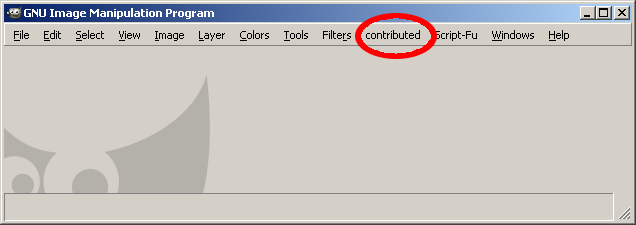
If it has registered correctly you should have a menu item like this:
Image

To be sure you have Python enabled, can you select Filters>>Python-Fu>>Console ?

Kevin


Top
 Post subject: Re: Noob time
PostPosted: Fri Jan 27, 2012 12:09 pm  (#3) 
Offline
GimpChat Member

Joined: Jan 26, 2012
Posts: 7
Hi Kevin, I do have Python-Fu>>Console, but I do not have contributed.

I saved the files in C:\Program Files (x86)\GIMP-2.0\lib\gimp\2.0\plug-ins

as test_v001.py

Thanks


Top
 Post subject: Re: Noob time
PostPosted: Fri Jan 27, 2012 12:10 pm  (#4) 
Offline
GimpChat Member

Joined: Jan 26, 2012
Posts: 7
I just re copied and pasted from teh site and it works? but others still are not...


Top
 Post subject: Re: Noob time
PostPosted: Fri Jan 27, 2012 12:17 pm  (#5) 
Offline
GimpChat Member

Joined: Jan 26, 2012
Posts: 7
Why doesnt this work?

#!/usr/bin/env python
# Author: Kevin Payne, small modification by John
# Copyright 2011 Kevin Payne
# License: GPL v3
# GIMP plugin to export the layers of an .xcf as jpg images
# each jpg file has the name of the layer
# For PhotoComix:- http://gimpchat.com/viewtopic.php?f=9&t=985#p10807

from gimpfu import *
import os.path
import pygtk
import gtk

# something to help with debugging
def debugMessage(Message):
dialog = gtk.MessageDialog(None, 0, gtk.MESSAGE_INFO, gtk.BUTTONS_OK, Message)
dialog.run()
dialog.hide()

# unique_filename from http://stackoverflow.com/questions/183480/is-this-the-best-way-to-get-unique-version-of-filename-w-python
def unique_filename(file_name):
counter = 1
file_name_parts = os.path.splitext(file_name) # returns ('/path/file', '.ext')
while os.path.isfile(file_name):
file_name = file_name_parts[0] + '_' + str(counter) + file_name_parts[1]
counter += 1
return file_name

# this is the bit that does all the work
def export_layers_as_jpg(img):
layer_ids = img.layers # get the layers in the image
directory_name = os.path.dirname(img.filename) # where is the source image

# debugMessage(directory_name)

num_layers = len(layer_ids)
for layer_num in range (0, num_layers): # work through layers (change to "num_layers-1" if you don't want the bottom layer)
layer_name = pdb.gimp_drawable_get_name(layer_ids[layer_num])
# debugMessage(layer_name)

# replace any illegal characters to be on the safe side
layer_name = layer_name.replace(":", ";")
layer_name = layer_name.replace("/", ";")
layer_name = layer_name.replace("\\", ";")
layer_name = layer_name.replace("?", ";")
layer_name = layer_name.replace("*", ";")
layer_name = layer_name.replace("\"", ";")
layer_name = layer_name.replace(" ", "_")

# debugMessage(layer_name)

# build the new file path - puts the saved layers in the same place as the source image
jpg_file = os.path.join(directory_name, layer_name + ".jpg")
jpg_file = unique_filename(jpg_file)

# debugMessage(png_file)
pdb.file_jpeg_save(img, layer_ids[layer_num], jpg_file, jpg_file, 1, 1, 1, 1, 0, 1, 1, 1, 1)

# The End of the main routine

# menu registration
register(
   "python-fu-export-layers-as-jpg",
   "Export Layers as JPGs",
   "Export Layers as JPGs",
   "paynekj",
   "GimpChat",
   "12.01.2011",
   "Export Layers as separate JPGs",
   "*",
   [
      (PF_IMAGE, "image",       "Input image", None),
   ],
   [],
   export_layers_as_jpg,
   menu="<Image>/Filters/Python-Fu"
   )

main()


Top
 Post subject: Re: Noob time
PostPosted: Fri Jan 27, 2012 12:31 pm  (#6) 
Offline
Script Coder
User avatar

Joined: Jun 22, 2010
Posts: 1171
Location: Here and there
Somehow you've lost all the indenting. For Python this is VERY IMPORTANT ;)


Top
 Post subject: Re: Noob time
PostPosted: Fri Jan 27, 2012 12:47 pm  (#7) 
Offline
GimpChat Member

Joined: Jan 26, 2012
Posts: 7
thank you! that I did now know haha Working great now!!


Top
 Post subject: Re: Noob time
PostPosted: Fri Jan 27, 2012 1:04 pm  (#8) 
Offline
Script Coder
User avatar

Joined: Jun 22, 2010
Posts: 1171
Location: Here and there
TheAdmiral wrote:
thank you! that I did now know haha Working great now!!


Good news, and Welcome to GimpChat.

Kevin


Top
 Post subject: Re: Noob time
PostPosted: Fri Jan 27, 2012 6:28 pm  (#9) 
Offline
Global Moderator
User avatar

Joined: May 16, 2010
Posts: 16023
Welcome to Gimp Chat! :)

_________________
Image


Top
 Post subject: Re: Noob time
PostPosted: Mon Jan 30, 2012 1:42 pm  (#10) 
Offline
GimpChat Member

Joined: Jan 26, 2012
Posts: 7
thanks guys!! trying to figure out some UI stuff now while i learn Pythons layout and syntax... My task is to eventually invent something that works like a timeline for frame sequences... wish me luck? haha


Top
 Post subject: Re: Noob time
PostPosted: Mon Jan 30, 2012 4:48 pm  (#11) 
Offline
GimpChat Member

Joined: Jan 26, 2012
Posts: 7
disregard the previous message... my friend google just introduced me to GAP :D now to break it!


Top
 Post subject: Re: Noob time
PostPosted: Mon Jan 30, 2012 5:07 pm  (#12) 
Offline
Global Moderator
User avatar

Joined: May 16, 2010
Posts: 16023
TheAdmiral wrote:
disregard the previous message... my friend google just introduced me to GAP :D now to break it!


Many have tried and failed to break GAP. :)
Have fun with it.We have many tutorials by ccbarr that are just awesome.He really knows GAP's in and outs.

_________________
Image


Top
Post new topic Reply to topic  [ 12 posts ] 

All times are UTC - 5 hours [ DST ]


* Login  


Powered by phpBB3 © phpBB Group