It is currently Wed Nov 25, 2026 8:48 am


All times are UTC - 5 hours [ DST ]


Post new topic Reply to topic  [ 129 posts ]  Go to page 1, 2, 3, 4, 5 ... 7  Next
Author Message
 Post subject: Re: Air Bubbles Script
PostPosted: Tue Jun 18, 2013 4:29 am  (#7) 
Offline
GimpChat Member
User avatar

Joined: Jan 03, 2011
Posts: 1656
Very cool script Graechan !


Top
 Post subject: Re: Air Bubbles Script
PostPosted: Tue Jun 18, 2013 5:31 am  (#8) 
Offline
GimpChat Member
User avatar

Joined: Jan 20, 2013
Posts: 14835
Location: roma, italy
you did it!!!! great!
may I make a suggestion? avoiding gmic refresh every time (have an option?)
Attachment:
letrmesee.png
letrmesee.png [ 329.84 KiB | Viewed 11862 times ]

_________________
"Where am I ?"


Top
 Post subject: Re: Air Bubbles Script
PostPosted: Tue Jun 18, 2013 5:57 am  (#9) 
Offline
GimpChat Member

Joined: May 09, 2012
Posts: 914
:tyspin Graechan


Attachments:
merci.jpg
merci.jpg [ 56.38 KiB | Viewed 11852 times ]
Top
 Post subject: Re: Air Bubbles Script
PostPosted: Tue Jun 18, 2013 8:51 am  (#10) 
Offline
GimpChat Member
User avatar

Joined: Apr 07, 2010
Posts: 14182
Image

_________________
Image


Top
 Post subject: Re: Air Bubbles Script
PostPosted: Tue Jun 18, 2013 9:07 am  (#11) 
Offline
GimpChat Member
User avatar

Joined: Jun 02, 2013
Posts: 2090
Graechan wrote:
The script is now using pack sprites if any one is having problems re-download script and refresh your GMIC (1-5-6-0)

also I do not know if it works in 2.6

Yep, works for me. Thanks again, appreciated.

_________________
Image


Top
 Post subject: Re: Air Bubbles Script
PostPosted: Tue Jun 18, 2013 9:11 am  (#12) 
Offline
GimpChat Member
User avatar

Joined: Sep 24, 2010
Posts: 12870
Thanks Graechan. How about object fill and bubbles? Again I asketh for too mucheth. lol

:)


Attachments:
Untitled.png
Untitled.png [ 1.54 MiB | Viewed 3675 times ]

_________________
Lyle

Psalm 109:8

Image
Top
 Post subject: Re: Air Bubbles Script
PostPosted: Tue Jun 18, 2013 10:14 am  (#13) 
Offline
GimpChat Member
User avatar

Joined: Jan 20, 2013
Posts: 14835
Location: roma, italy
dinasset wrote:
you did it!!!! great!
may I make a suggestion? avoiding gmic refresh every time (have an option?)


maybe this "suggestion" should become a question for Ronounours? I saw the script calls the plug-in-gmic, is it possible to ask not to refresh gmic before executing the plug-in?

_________________
"Where am I ?"


Top
 Post subject: Re: Air Bubbles Script
PostPosted: Tue Jun 18, 2013 10:23 am  (#14) 
Offline
Global Moderator
User avatar

Joined: May 16, 2010
Posts: 16309
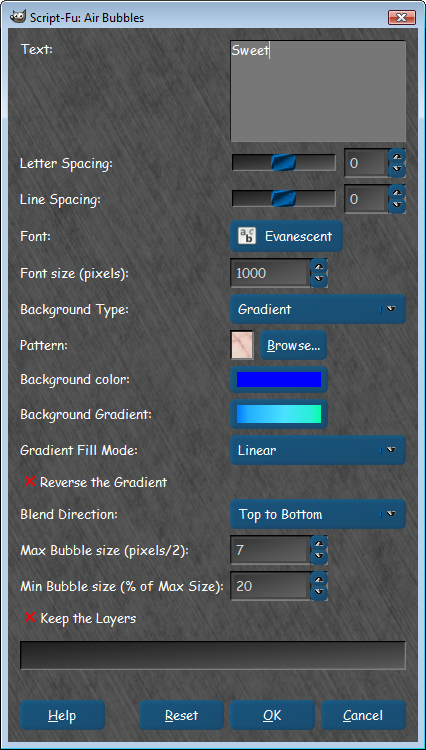
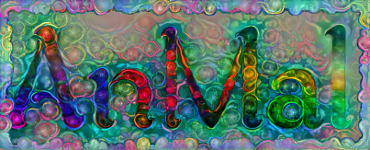
Very nifty script Graechan. :) I set the max font size to 5000 instead of 500 though. It seems to work better with thinner fonts that way. Probably because the font width is larger so the bubbles fill better?
Image

Settings
Image

_________________
Image


Top
 Post subject: Re: Air Bubbles Script
PostPosted: Tue Jun 18, 2013 10:35 am  (#15) 
Offline
GimpChat Member
User avatar

Joined: Jan 03, 2011
Posts: 1656
dinasset : I've just checked, but when calling G'MIC, it is not calling the update that download files from the net. It just calls the update procedure that load the files locally stored on your computer. This procedure is *not* time consuming (few milliseconds probably) and is necessary by the way to have access to command '-pack_sprites'.
Most of the time spend by the script is in fact due to the computation by itself (yes, pack_sprites is a demanding command).


Top
 Post subject: Re: Air Bubbles Script
PostPosted: Tue Jun 18, 2013 11:23 am  (#16) 
Offline
GimpChat Member
User avatar

Joined: Jan 20, 2013
Posts: 14835
Location: roma, italy
oh, I see, I thought was the "refreshing" command...OK, thanks for the clear explanation

_________________
"Where am I ?"


Top
 Post subject: Re: Air Bubbles Script
PostPosted: Tue Jun 18, 2013 12:23 pm  (#17) 
Offline
GimpChat Member
User avatar

Joined: Aug 16, 2012
Posts: 4271
Location: Göteborg, Sweden
graechan: nice job! :jumpclap :jumpclap :jumpclap :jumpclap :jumpclap :jumpclap :jumpclap :jumpclap :jumpclap alpha to logo on it's way, by any chance...?

_________________


Top
 Post subject: Re: Air Bubbles Script
PostPosted: Tue Jun 18, 2013 1:07 pm  (#18) 
Offline
Retired Staff
User avatar

Joined: May 22, 2008
Posts: 6946
Location: Somewhere in GIMP
This is great Graechan. At first, it didn't work until I went in and refreshed G'MIC, then it worked fine.

Image

_________________
Image
World War IV will be fought with sticks and stones. - Albert Einstein


Top
 Post subject: Re: Air Bubbles Script
PostPosted: Tue Jun 18, 2013 1:45 pm  (#19) 
Offline
GimpChat Member
User avatar

Joined: Sep 24, 2010
Posts: 12870
AnMal wrote:
graechan: nice job! :jumpclap :jumpclap :jumpclap :jumpclap :jumpclap :jumpclap :jumpclap :jumpclap :jumpclap alpha to logo on it's way, by any chance...?


Don't need alpha to logo AnMal; just click the keep layers option. :)

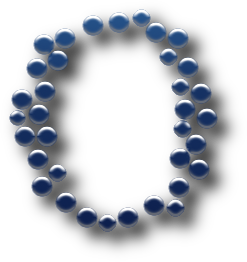
Definitely another wonderful O, O. Getting to wonder if you work for the said (Overstock.com) warehouse company. lololol

:)

_________________
Lyle

Psalm 109:8

Image


Top
 Post subject: Re: Air Bubbles Script
PostPosted: Tue Jun 18, 2013 2:07 pm  (#20) 
Offline
GimpChat Member
User avatar

Joined: Jun 16, 2013
Posts: 107
I love it, thanks for your work


Top
 Post subject: Re: Air Bubbles Script
PostPosted: Tue Jun 18, 2013 2:14 pm  (#21) 
Offline
GimpChat Member
User avatar

Joined: Jan 20, 2013
Posts: 14835
Location: roma, italy
Graechan,
sorry to tell you there is a problem with the interface to G'MIC.
Do the following:
Test1:
-verify that either G'MIC has not been used yet or that has been used with output mode default "in place"
-run your Bubble script (dft values)
-result is OK
Test2:
-open an image
-apply to that image any G'MIC function setting output to "new image"
-run your Bubble script (dft values)
-result is two different images, one with text, the second with background
I attach here the results:
Attachment:
TEST1-GMIC-inplace.png
TEST1-GMIC-inplace.png [ 96.36 KiB | Viewed 2392 times ]
Attachment:
Test2_GMIC-newimage-OUT1.png
Test2_GMIC-newimage-OUT1.png [ 32.69 KiB | Viewed 2392 times ]
Attachment:
Test2_GMIC-newimage-OUT2.png
Test2_GMIC-newimage-OUT2.png [ 5.68 KiB | Viewed 2392 times ]

_________________
"Where am I ?"


Top
 Post subject: Re: Air Bubbles Script
PostPosted: Tue Jun 18, 2013 7:26 pm  (#22) 
Offline
Script Coder
User avatar

Joined: Feb 18, 2011
Posts: 4826
Location: Bendigo Vic. Australia
Dinasset the command for GMIC in the gimp PDB only allows me to set the 'Input Mode' the output mode seems to take whatever has been set by the user, and if this is not the 'default(inplace)' problems always arise, maybe David could explain better

(plug-in-gmic run-mode image drawable input command)

_________________
Image
No matter how much you push the envelope, it'll still be stationery.


Top
 Post subject: Re: Air Bubbles Script
PostPosted: Tue Jun 18, 2013 11:41 pm  (#23) 
Offline
Script Coder
User avatar

Joined: Feb 18, 2011
Posts: 4826
Location: Bendigo Vic. Australia
'O' if you had selected 'keep layers' you would also find it saved a couple of channels to help modify the image with selections e.t.c.

ImageImageImage

_________________
Image
No matter how much you push the envelope, it'll still be stationery.


Top
 Post subject: Re: Air Bubbles Script
PostPosted: Wed Jun 19, 2013 1:15 am  (#24) 
Offline
GimpChat Member
User avatar

Joined: Nov 16, 2011
Posts: 5127
Location: Metro Vancouver, BC
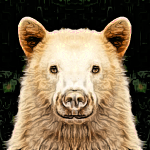
Image
Thank you, Graechan!

_________________
Image
Gimp 2.8.18, Linux, median user
Gimp Chat Tutorials Index
Spirit Bear (Kermode)


Top
 Post subject: Re: Air Bubbles Script
PostPosted: Wed Jun 19, 2013 1:44 am  (#25) 
Offline
GimpChat Member
User avatar

Joined: Jan 03, 2011
Posts: 1656
Ha you are right Graechan, maybe I should add a new argument to specify the output mode as well...
But I'm afraid doing this will break all existing scripts that are using gmic...
Is there a way to have 'optional' arguments in script-fu ?


Top
 Post subject: Re: Air Bubbles Script
PostPosted: Wed Jun 19, 2013 2:12 am  (#26) 
Offline
Script Coder
User avatar

Joined: Feb 18, 2011
Posts: 4826
Location: Bendigo Vic. Australia
Ronounours wrote:
Ha you are right Graechan, maybe I should add a new argument to specify the output mode as well...
But I'm afraid doing this will break all existing scripts that are using gmic...
Is there a way to have 'optional' arguments in script-fu ?

David there is no way the script can change what gmic does with the output but if there was a way for any new filter to have the option to select the output mode then we could set this in scripts, this would have no effect on existing scripts that are using gmic, and would only change the plugin for the duration it is used

Or if you could enforce the plugin to always use the 'In place(default)' output mode then we could effect the output in a script e.g. if output 'New Image' was required we could create a new Image and copy the input layer to the new image then use the new image and its copied layer as the gmic input

_________________
Image
No matter how much you push the envelope, it'll still be stationery.


Top
Post new topic Reply to topic  [ 129 posts ]  Go to page 1, 2, 3, 4, 5 ... 7  Next

All times are UTC - 5 hours [ DST ]


* Login  


Powered by phpBB3 © phpBB Group