It is currently Thu Oct 15, 2026 7:05 pm


All times are UTC - 5 hours [ DST ]


Post new topic Reply to topic  [ 127 posts ]  Go to page Previous  1 ... 3, 4, 5, 6, 7  Next
Author Message
 Post subject: Re: Bytes and Pixels Vector Path plugin
PostPosted: Sun Jul 01, 2012 11:27 am  (#111) 
Offline
Global Moderator
User avatar

Joined: May 16, 2010
Posts: 16201
Man i had no idea this was released yet! :)
Sweet!
I will have a go at it later tonight.

Thanks B and P.


Top
 Post subject: Re: Bytes and Pixels Vector Path plugin
PostPosted: Sun Jul 01, 2012 11:54 am  (#112) 
Offline
Global Moderator
User avatar

Joined: May 16, 2010
Posts: 16201
Couldn't wait. :)

Image

Very nice. :bigthup


Top
 Post subject: Re: Bytes and Pixels Vector Path plugin
PostPosted: Sun Jul 01, 2012 4:41 pm  (#113) 
Offline
GimpChat Member

Joined: Jun 21, 2012
Posts: 106
Looks like something cool to play with if I ever tire with MM.

Couldn't you use a macro recorder/replayer to save/restore your presets? I use Autohotkeys on Windows (but there must dozens of others) and was thinking of doing similar for Mathmap to save/reload my user values. Write/record a script with your settings in and get the macro program to "type" them into the right places on the dialogs. You'd have a separate script - which could be copied and tweaked - for each of your patterns.


Top
 Post subject: Re: Bytes and Pixels Vector Path plugin
PostPosted: Sun Oct 28, 2012 10:02 am  (#114) 
Offline
New Member

Joined: Oct 28, 2012
Posts: 1
Have a problem with the formula viewer, I get an error saying something to the effect that windows could not open "C:\Program Files\Gimp 2\32\lib\gimp\2.0\python\formula_viewer2.pyw" because it was an unknown file type. The vector path plugin runs as normal however. Any suggestions on how to get the formula viewer running with the plugin? (I am running windows 7 64 bit, gimp version 2.8.2, full install) Any help will be apprectiated, Thanks


Top
 Post subject: Re: Bytes and Pixels Vector Path plugin
PostPosted: Fri May 16, 2014 5:18 am  (#115) 
Offline
GimpChat Member
User avatar

Joined: Feb 27, 2014
Posts: 26
Graechan wrote:
I have the official 64bit version and that is the correct path for the python folder

This is a list of my files and there paths

C:\Program Files\GIMP 2\32\lib\gimp\2.0\python\formula_viewer.pyw
C:\Program Files\GIMP 2\32\lib\gimp\2.0\python\formula_presets.csv
C:\Users\Graechan\.gimp-2.8\plug-ins\b&p_vector_path_1.py
My install works fine


I just got gimp 2.8 recently. other than a few changes, we get along ok. :) But, yesterday, I started trying to do some plug ins, since I know that python is already on it. to my frustration I can NOT figure out what to do... there are so many more files and when I saw the above, I was like... YES! (I had no idea about that file, and if Rod hadn't commented on it being odd, I would've ignored it, so thank you both, but I'm still sooooooo frustrated!!!! :gaah :gaah :gaah and no freaking clue what to do. le sigh... so any and all help would be appreciated.. I have a windows 8, also.. which I dont love.. its a 64 bit.. I dont even know what that means... lol.... but I dont love change much. again, thank youuuu!


Top
 Post subject: Re: Bytes and Pixels Vector Path plugin
PostPosted: Fri May 16, 2014 6:33 pm  (#116) 
Offline
GimpChat Member
User avatar

Joined: Feb 27, 2014
Posts: 26
:bump


Top
 Post subject: Re: Bytes and Pixels Vector Path plugin
PostPosted: Fri May 16, 2014 6:52 pm  (#117) 
Offline
Script Coder
User avatar

Joined: Feb 18, 2011
Posts: 4826
Location: Bendigo Vic. Australia
Leigh I'm a bit lost here, what is your problem with this plugin (Bytes and Pixels Vector Path)

_________________
Image
No matter how much you push the envelope, it'll still be stationery.


Top
 Post subject: Re: Bytes and Pixels Vector Path plugin
PostPosted: Fri May 16, 2014 8:04 pm  (#118) 
Offline
GimpChat Member
User avatar

Joined: Feb 27, 2014
Posts: 26
It doesn't even show up on gimp. I put everything exactly where you did and nada....


Top
 Post subject: Re: Bytes and Pixels Vector Path plugin
PostPosted: Mon May 19, 2014 11:33 pm  (#119) 
Offline
GimpChat Member

Joined: Apr 29, 2012
Posts: 44
Hey guys, it's been awhile! I don't think I can help, as I am not to good with all these installation procedures, but just to share my experience. I have new system at the office :

GIMP 2.8.10
Windows 7 Enterprise 64-bit (6.1, Build 7601) Service Pack 1 (7601.win7sp1_gdr.130828-1532)
I just dropped all my plugs in C:\Users\[username]\.gimp-2.8\plug-ins

and it's all showing up and works (except for Glossy button 1 generator).

I have Windows 8 64-bit at home and Gimp 2.8 as well (I believe), I think I got my plugs there as well. Will double check when I get home and post here.


Top
 Post subject: Re: Bytes and Pixels Vector Path plugin
PostPosted: Tue May 20, 2014 1:40 am  (#120) 
Offline
Script Coder
User avatar

Joined: Feb 18, 2011
Posts: 4826
Location: Bendigo Vic. Australia
Leigh after install per↓

Quote:
Vector Path v2.0
Python plug-in for Gimp v2.6/2.8 (separate packages)
2012 - Jun - 19

To Install:
1. Place the b&p_vector_path2.py to your plug-ins folder (usually ~gimp\lib\gimp\2.0\plug-ins)

2. To use assistant app, place the formula_viewer2.pyw and formula_presets2.csv to your gimp python folder (usually ~lib\gimp\2.0\python) but for 64bit gimp may be 32/lib/gimp/2.0/python

and after restarting your gimp the filter location is Filters/Bytes and Pixels.com/Vector Path

_________________
Image
No matter how much you push the envelope, it'll still be stationery.


Last edited by Graechan on Tue May 20, 2014 2:47 am, edited 2 times in total.

Top
 Post subject: Re: Bytes and Pixels Vector Path plugin
PostPosted: Tue May 20, 2014 2:38 am  (#121) 
Offline
GimpChat Member

Joined: Apr 29, 2012
Posts: 44
Also, to see possible errors, run Gimp with --verbose parameter, then check the console output.

Example:
"C:\Program Files\GIMP 2\bin\gimp-2.8.exe" --verbose


Top
 Post subject: Re: Bytes and Pixels Vector Path plugin
PostPosted: Thu Feb 12, 2015 3:37 pm  (#122) 
Offline
GimpChat Member
User avatar

Joined: Mar 10, 2014
Posts: 845
I can't download the Vector path v2.0.py from the www.bytes-and-pixels.com
it will be nice to be appended here. Thanks


Top
 Post subject: Re: Bytes and Pixels Vector Path plugin
PostPosted: Thu Feb 12, 2015 5:43 pm  (#123) 
Offline
Script Coder
User avatar

Joined: Feb 18, 2011
Posts: 4826
Location: Bendigo Vic. Australia
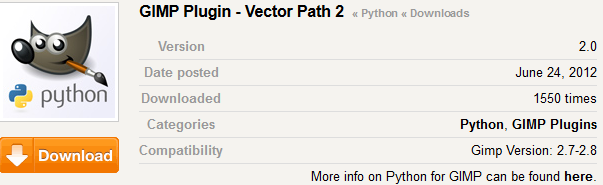
Use this link Vector path 2 then click on the orange Download button
Image

_________________
Image
No matter how much you push the envelope, it'll still be stationery.


Top
 Post subject: Re: Bytes and Pixels Vector Path plugin
PostPosted: Thu Feb 12, 2015 7:15 pm  (#124) 
Offline
GimpChat Member
User avatar

Joined: Mar 10, 2014
Posts: 845
Thanks Graechan, but after you click on the orange button will appear DOWNLOAD DOES NOT EXIST!


Top
 Post subject: Re: Bytes and Pixels Vector Path plugin
PostPosted: Thu Feb 12, 2015 7:24 pm  (#125) 
Offline
Script Coder
User avatar

Joined: Feb 18, 2011
Posts: 4826
Location: Bendigo Vic. Australia
It's there Marcello (just scroll down a little) but here it is anyway

Attachment:
Vector_Path2_Gimp_plug-in.zip [17.5 KiB]
Downloaded 169 times

_________________
Image
No matter how much you push the envelope, it'll still be stationery.


Top
 Post subject: Re: Bytes and Pixels Vector Path plugin
PostPosted: Thu Feb 12, 2015 7:59 pm  (#126) 
Offline
GimpChat Member
User avatar

Joined: Mar 10, 2014
Posts: 845
Graechan wrote:
It's there Marcello (just scroll down a little) but here it is anyway

Attachment:
Vector_Path2_Gimp_plug-in.zip

:oops: :oops: :oops: :oops: :oops: :tyspin


Top
 Post subject: Re: Bytes and Pixels Vector Path plugin
PostPosted: Fri Feb 13, 2015 3:40 pm  (#127) 
Offline
GimpChat Member
User avatar

Joined: Mar 10, 2014
Posts: 845
just a test

Image


Top
Post new topic Reply to topic  [ 127 posts ]  Go to page Previous  1 ... 3, 4, 5, 6, 7  Next

All times are UTC - 5 hours [ DST ]


* Login  


Powered by phpBB3 © phpBB Group