It is currently Wed Sep 23, 2026 6:41 pm


All times are UTC - 5 hours [ DST ]


Post new topic Reply to topic  [ 8 posts ] 
Author Message
 Post subject: Unanchoring a dialog from a dock border (Solved)
PostPosted: Sun Aug 25, 2013 9:42 am  (#1) 
Offline
GimpChat Member
User avatar

Joined: Aug 30, 2012
Posts: 2174
GIMP Version: 2.8.6
Operating System: Linux
OS Version: Ubuntu 12.04
GIMP Experience: Intermediate Level


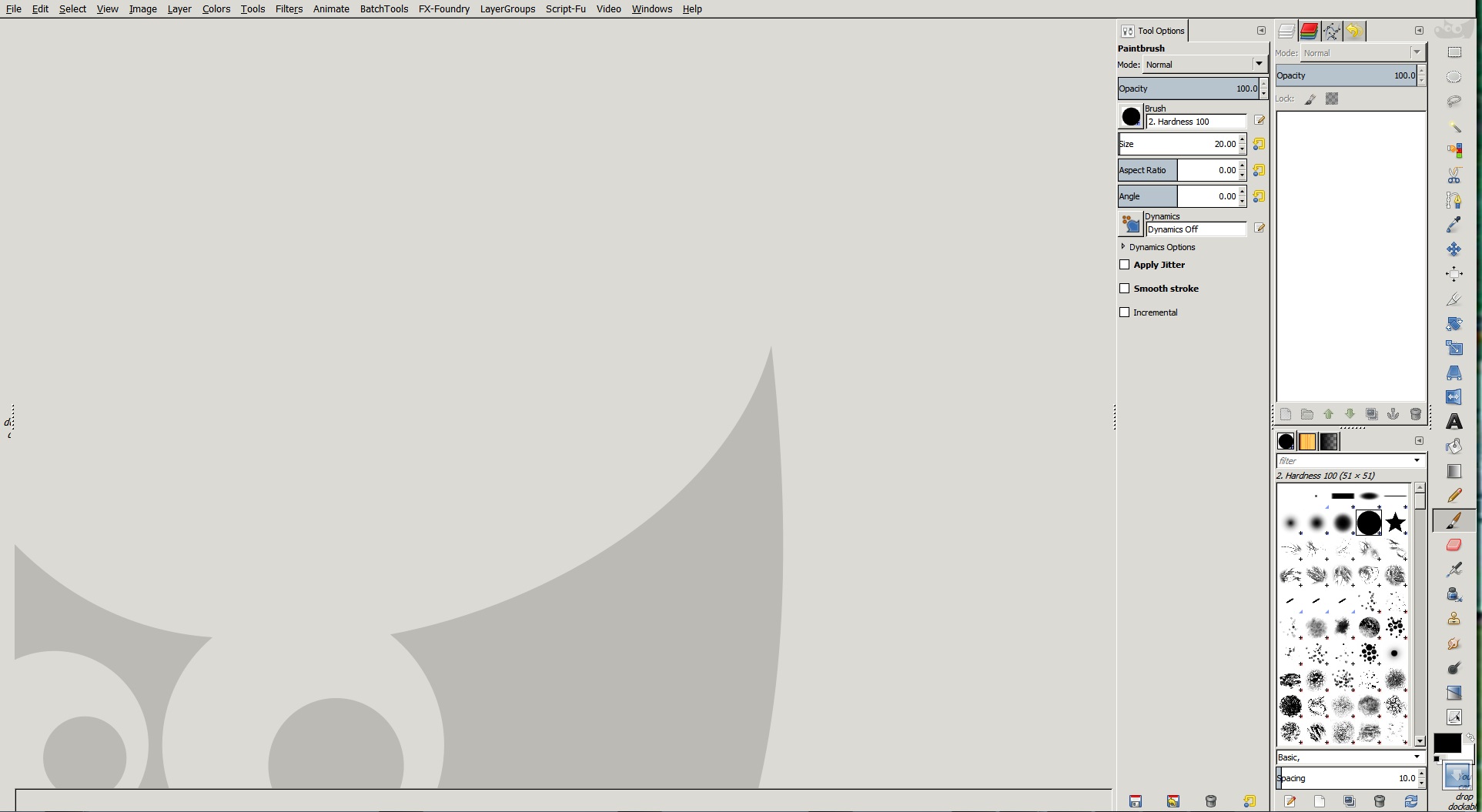
So this is the normal gimp set up I use, the default, tools on the left and layers on the right.

Image

I was playing about and have somehow managed to dock the layers and tool dialogues together (see image below), Question - How to I unanchore them?

Image

_________________
Image


Last edited by he4rty on Sun Aug 25, 2013 10:33 am, edited 1 time in total.

Share on Facebook Share on Twitter Share on Orkut Share on Digg Share on MySpace Share on Delicious Share on Technorati
Top
 Post subject: Re: Unanchoring a dialog from a dock border
PostPosted: Sun Aug 25, 2013 10:22 am  (#2) 
Offline
GimpChat Member
User avatar

Joined: Jul 17, 2012
Posts: 2769
you cant, once you found that configuration you can never go back
also Gimp will selfdestruct in 2 days


no really, its the single window mode, he4rty


Top
 Post subject: Re: Unanchoring a dialog from a dock border
PostPosted: Sun Aug 25, 2013 10:26 am  (#3) 
Offline
GimpChat Member
User avatar

Joined: Aug 30, 2012
Posts: 2174
It is but even when I go back to multi window mode they are still attached, been searching the net and gimp doc's seem to tell you how to anchore them but not how to seperate them, I'm in touch with a divorce lawyer at the moment because I can't think of anything else.

_________________
Image


Top
 Post subject: Re: Unanchoring a dialog from a dock border
PostPosted: Sun Aug 25, 2013 10:28 am  (#4) 
Offline
GimpChat Member
User avatar

Joined: Sep 22, 2012
Posts: 2089
Location: US
I know how to do that but it's too long to describe. If you want to reverse it back to default layout just Reset_Saved_Window_Position_to_Default_Values in Preferences->Window Management. Restart


Top
 Post subject: Re: Unanchoring a dialog from a dock border
PostPosted: Sun Aug 25, 2013 10:33 am  (#5) 
Offline
GimpChat Member
User avatar

Joined: Aug 30, 2012
Posts: 2174
K1TesseraEna - Thank you so much, I kept looking under window appearence.

_________________
Image


Top
 Post subject: Re: Unanchoring a dialog from a dock border
PostPosted: Sun Aug 25, 2013 10:34 am  (#6) 
Offline
GimpChat Member
User avatar

Joined: Sep 22, 2012
Posts: 2089
Location: US
You're welcome He4rty!

Messed up my layout just for demonstration purposes here :hehe
thank goodness, it'a reversible

Image


Top
 Post subject: Re: Unanchoring a dialog from a dock border (Solved)
PostPosted: Sun Aug 25, 2013 10:42 am  (#7) 
Offline
GimpChat Member
User avatar

Joined: Jul 17, 2012
Posts: 2769
i put all the docks to the right, then activated the single windows mode
after going back, my tool box and layer docks stayed attached, just as yours, lol

solution:
i pulled out all the tabs and closed them
that freed my toolbox

then i opened the individual docks (layers/paths/journal) and joined them (drag)
after that i docked the fonts/brush/pattern and gradient docks to the bottom

he4rty dont do that ever again, please :cry :mrgreen:


Top
 Post subject: Re: Unanchoring a dialog from a dock border (Solved)
PostPosted: Sun Aug 25, 2013 11:12 am  (#8) 
Offline
GimpChat Member
User avatar

Joined: Aug 30, 2012
Posts: 2174
Thanks for all the help , I think I'll just stick with the default reset button, looks far less complicated.

_________________
Image


Top
Post new topic Reply to topic  [ 8 posts ] 

All times are UTC - 5 hours [ DST ]


* Login  


Powered by phpBB3 © phpBB Group