It is currently Mon Jun 15, 2026 7:53 am


All times are UTC - 5 hours [ DST ]


Post new topic Reply to topic  [ 159 posts ]  Go to page Previous  1, 2, 3, 4, 5, 6 ... 8  Next
Author Message
 Post subject: Re: The RGGJAN Portable
PostPosted: Mon Sep 26, 2011 12:46 pm  (#51) 
Offline
GimpChat Member
User avatar

Joined: Apr 07, 2010
Posts: 14182
very good, they are almost kissing.

@lyle, love your cat. nice job

_________________
Image


Top
 Post subject: Re: The RGGJAN Portable
PostPosted: Sun Oct 09, 2011 3:12 am  (#52) 
Offline
GimpChat Member
User avatar

Joined: Apr 22, 2010
Posts: 126
Many thanks to RGGJAN and Partha,great job. :bigthup
It works stable on windows7 64bit.
Thanks :tyspin

www.youtube.com Video from : www.youtube.com

_________________
Image


Top
 Post subject: Re: The RGGJAN Portable
PostPosted: Sun Oct 09, 2011 7:38 am  (#53) 
Offline
GimpChat Member
User avatar

Joined: Apr 08, 2010
Posts: 5420
Location: Northwest Ohio
I wish there was an OSX build of this, it looks like an awesome tool


Top
 Post subject: Re: The RGGJAN Portable
PostPosted: Sun Oct 09, 2011 10:18 am  (#54) 
Offline
Global Moderator
User avatar

Joined: May 16, 2010
Posts: 16028
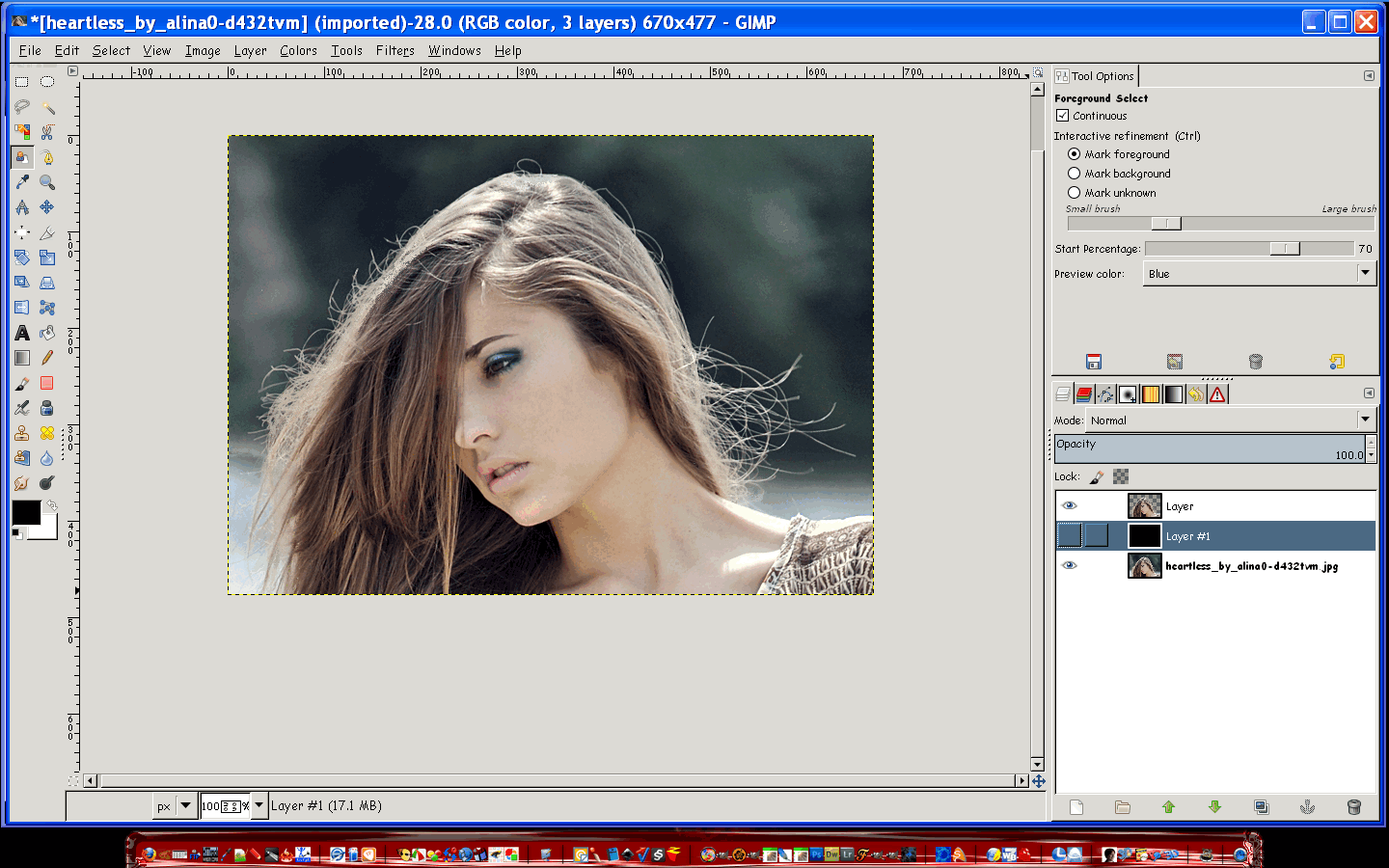
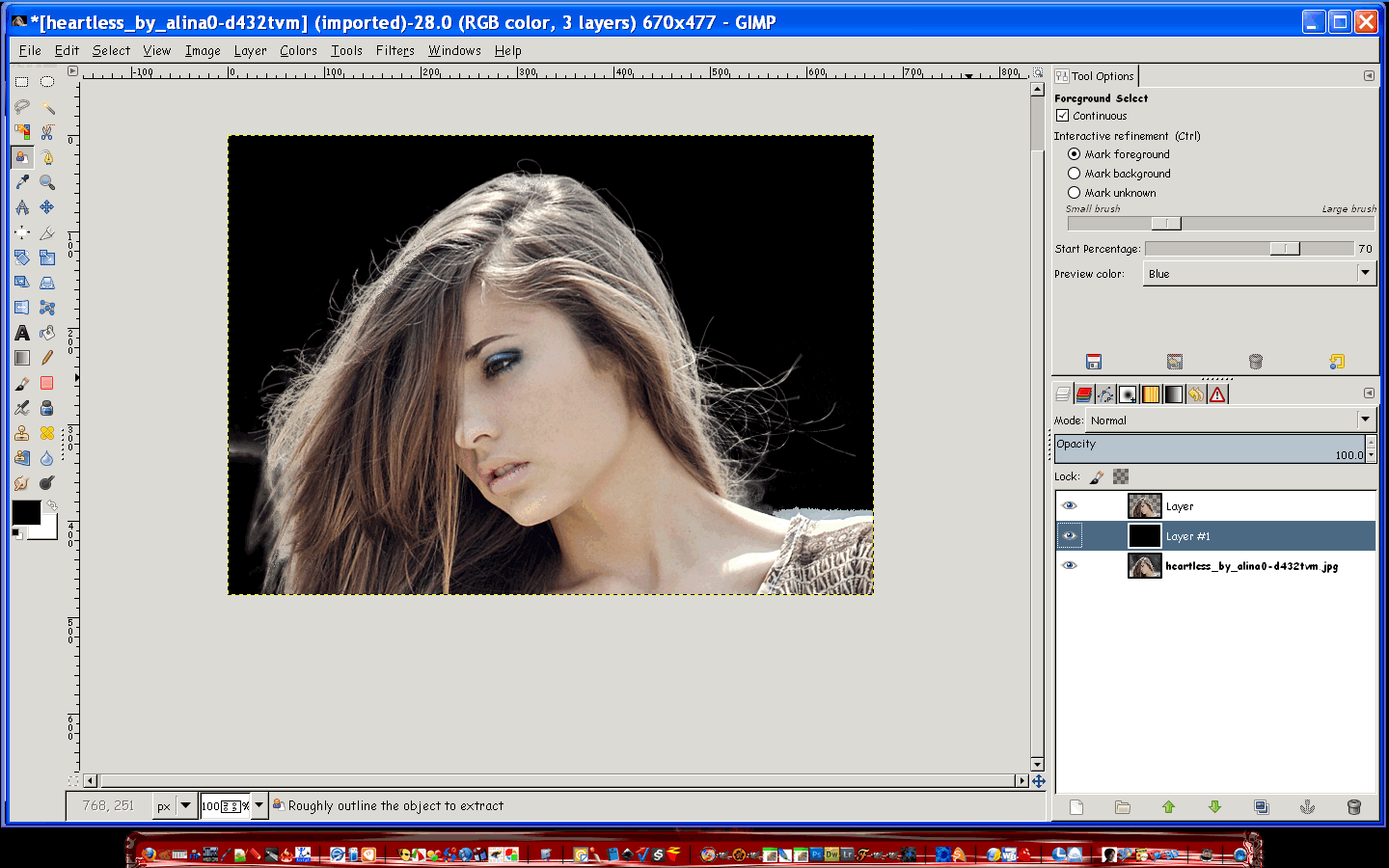
Well it does work on 1 gig RAM. You just need to use it correctly.

Original
Image

Extracted with black bg added
Image

I am impressed. :)

_________________
Image


Top
 Post subject: Re: The RGGJAN Portable
PostPosted: Sun Oct 09, 2011 10:01 pm  (#55) 
Offline
GimpChat Member

Joined: Jul 11, 2010
Posts: 349
I am using it on an old 1 GHz Aflon processor, 512MB RAM, and it works great! I have mot tried it on a photo greater than 5 MPix, but will probably try soon.

XP 32 sp3


Top
 Post subject: Re: The RGGJAN Portable
PostPosted: Mon Oct 10, 2011 3:27 am  (#56) 
Offline
GimpChat Member

Joined: Sep 20, 2011
Posts: 5
pogogogo wrote:
Many thanks to RGGJAN and Partha,great job. :bigthup
It works stable on windows7 64bit.
Thanks :tyspin

www.youtube.com Video from : www.youtube.com


Cool video :)


Top
 Post subject: Re: The RGGJAN Portable
PostPosted: Thu Oct 13, 2011 8:28 pm  (#57) 
Offline
GimpChat Member

Joined: Mar 14, 2011
Posts: 998
pogogogo wrote:
Many thanks to RGGJAN and Partha,great job. :bigthup
It works stable on windows7 64bit.
Thanks :tyspin

It should be since I compiled on a Windows 7 64-bit machine. :)
Quote:
www.youtube.com Video from : www.youtube.com

Great video. :)

Partha


Top
 Post subject: Re: The RGGJAN Portable
PostPosted: Fri Oct 14, 2011 7:44 pm  (#58) 
Offline
GimpChat Member

Joined: Jul 11, 2010
Posts: 349
I love the Partha 2.7.4 with all the extra plugins and python.
I love the Partha 2.7.4 with RGGJAN.

Is their a way to get both into one? The RGGIAN doesn't have python and is missing some plugins.

Right now I have two different versions of 2.7.4 and I have to switch back and forth to do some of what I want.

Am I doing something wrong?


Top
 Post subject: Re: The RGGJAN Portable
PostPosted: Fri Oct 14, 2011 7:57 pm  (#59) 
Offline
GimpChat Member

Joined: Apr 12, 2010
Posts: 5870
Humm..i didn't try but you should have no problem to add plugin

For python ...also that may be doable but looks more complex

_________________
My 3D Gallery on Deviantart http://photocomix2.deviantart.com/
Main gallery http://www.flickriver.com/photos/photocomix-mandala/
Mandala and simmetry http://www.flickriver.com/photos/photocomix_mandala/

Image

Mrs Wilbress


Top
 Post subject: Re: The RGGJAN Portable
PostPosted: Fri Oct 14, 2011 10:15 pm  (#60) 
Offline
GimpChat Member

Joined: Mar 14, 2011
Posts: 998
bilbo9955 wrote:
I love the Partha 2.7.4 with all the extra plugins and python.
I love the Partha 2.7.4 with RGGJAN.

Is their a way to get both into one? The RGGIAN doesn't have python and is missing some plugins.

Right now I have two different versions of 2.7.4 and I have to switch back and forth to do some of what I want.

Am I doing something wrong?

Well, when I built RGGJAN, Jan had not updated his fork for quite awhile and hence I provided a portable minimal built. He has since updated the source to 2.7.4. :)

Thanks,
Partha

PS: No reason you cannot add more plugins as PC has pointed out.


Top
 Post subject: Re: The RGGJAN Portable
PostPosted: Sat Oct 15, 2011 5:53 pm  (#61) 
Offline
GimpChat Member

Joined: Jul 11, 2010
Posts: 349
When I install the RGGJAN, Python isn't active in this version, although I see a folder for it. What files do I need to move from this version into the other version to have it in the other version?


Top
 Post subject: Re: The RGGJAN Portable
PostPosted: Sat Oct 15, 2011 6:10 pm  (#62) 
Offline
GimpChat Member
User avatar

Joined: Apr 07, 2010
Posts: 14182
You would have to install Python, you can't just move it from one version to another. There is a very good tutorial in the tutorial section by Rod how to install Python and also has the links to download.

_________________
Image


Top
 Post subject: Re: The RGGJAN Portable
PostPosted: Sat Oct 15, 2011 6:29 pm  (#63) 
Offline
GimpChat Member

Joined: Jul 11, 2010
Posts: 349
Molly,
Thank you for the reply. I seem to have misstated what I want. I want to move the RGGJAN tool into the main build.


Top
 Post subject: Re: The RGGJAN Portable
PostPosted: Sat Oct 15, 2011 6:30 pm  (#64) 
Offline
GimpChat Member
User avatar

Joined: Apr 07, 2010
Posts: 14182
I don't know if anyone has been able to do that but you could ask Partha, he would know.

_________________
Image


Top
 Post subject: Re: The RGGJAN Portable
PostPosted: Sat Oct 15, 2011 8:27 pm  (#65) 
Offline
GimpChat Member

Joined: Apr 12, 2010
Posts: 5870
I don't think you may do with this version because is not based on gimp 2.7
if i understand well is ready a updated code but is not yet compiled..

what you plan to do ,combine 2 different version working at binary level (in more simple words just by moving exe. ,dll and other files and folders )is not easy and maybe not even possible

look easier (but not easy ...i would wait for Partha to do ) compile the code of the newer version of reggjan that is based on gimp 2.7.4

_________________
My 3D Gallery on Deviantart http://photocomix2.deviantart.com/
Main gallery http://www.flickriver.com/photos/photocomix-mandala/
Mandala and simmetry http://www.flickriver.com/photos/photocomix_mandala/

Image

Mrs Wilbress


Top
 Post subject: Re: The RGGJAN Portable
PostPosted: Sat Oct 15, 2011 9:41 pm  (#66) 
Offline
GimpChat Member

Joined: Jul 11, 2010
Posts: 349
By regular I meant Partha's regular 2.7.4 version. Sorry!

I want to move the RGGJAN plugin from Partha's 2.7.4 RGGJAN to Partha's standard 2.7.4 version.


Top
 Post subject: Re: The RGGJAN Portable
PostPosted: Sat Oct 15, 2011 10:19 pm  (#67) 
Offline
GimpChat Member
User avatar

Joined: Jul 04, 2011
Posts: 395
Location: Indianapolis, IN
I tried it and it works for me although I'm still getting some of the background when the new layer is created.

I'm guessing it has something to do with the "Starting Percentage?" I didn't even touch it from the default of 70. How can I gauge were that should be. Also, when I paint the foreground how close to I need to get to the edge.

The other problem I have is letting go of the mouse while painting. I guess you have to pick your brush size before painting, no switching mid flight.

This is still really cool!

_________________
"That which does not kill us makes us stronger." ~ Friedrich Nietzsche


Top
 Post subject: Re: The RGGJAN Portable
PostPosted: Sun Oct 16, 2011 5:44 am  (#68) 
Offline
GimpChat Member
User avatar

Joined: Apr 22, 2010
Posts: 126
bilbo9955 wrote:
When I install the RGGJAN, Python isn't active in this version, although I see a folder for it. What files do I need to move from this version into the other version to have it in the other version?


Hi bilbo9955
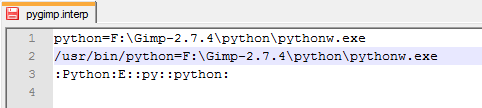
Change the path in the file pygimp.interp (F: \ Gimp-2.7.4 \ lib \ gimp \ 2.0 \ interpreters \ pygimp.interp)
I have a python in GIMP-rggjan after changing path to Image
F: - This is the name of my removable disk. :)

_________________
Image


Top
 Post subject: Re: The RGGJAN Portable
PostPosted: Tue Oct 18, 2011 11:16 am  (#69) 
Offline
GimpChat Member
User avatar

Joined: Jul 04, 2011
Posts: 395
Location: Indianapolis, IN
MrBiggz wrote:
I tried it and it works for me although I'm still getting some of the background when the new layer is created.

I'm guessing it has something to do with the "Starting Percentage?" I didn't even touch it from the default of 70. How can I gauge were that should be. Also, when I paint the foreground how close to I need to get to the edge.

The other problem I have is letting go of the mouse while painting. I guess you have to pick your brush size before painting, no switching mid flight.


?

_________________
"That which does not kill us makes us stronger." ~ Friedrich Nietzsche


Top
 Post subject: Re: The RGGJAN Portable
PostPosted: Wed Oct 19, 2011 6:29 pm  (#70) 
Offline
GimpChat Member

Joined: Jul 11, 2010
Posts: 349
pogogogo wrote:
bilbo9955 wrote:
When I install the RGGJAN, Python isn't active in this version, although I see a folder for it. What files do I need to move from this version into the other version to have it in the other version?


Hi bilbo9955
Change the path in the file pygimp.interp (F: \ Gimp-2.7.4 \ lib \ gimp \ 2.0 \ interpreters \ pygimp.interp)
I have a python in GIMP-rggjan after changing path to Image
F: - This is the name of my removable disk. :)


Thank you pogogogo, that solved my problem!

Actually what I did was install Partha's standard 2.7.4 portable. I than installed the RGGJAN version over the one I just installed. Finialy, I did your fix.

I now have the RGGJAN version with all the plugins.

Thanks again!


Top
Post new topic Reply to topic  [ 159 posts ]  Go to page Previous  1, 2, 3, 4, 5, 6 ... 8  Next

All times are UTC - 5 hours [ DST ]


* Login  


Powered by phpBB3 © phpBB Group