It is currently Tue May 21, 2013 12:21 pm


Latest GIMP Scripts & Plug-ins

All times are UTC - 5 hours [ DST ]


Post new topic Reply to topic  [ 57 posts ]  Go to page Previous  1, 2, 3, 4, 5, 6  Next
Author Message
 Post subject: Re: gramg support thread
PostPosted: Mon Mar 04, 2013 2:46 pm  (#21) 
Offline
GimpChat Member
User avatar

Joined: Feb 20, 2013
Posts: 1153
Sometimes confusion can be fun...I just keep bouncing from one thing to another...sometime I get it right and other times no...but then something will click and I go back and ta da...then the brain has had time to process it. But, I am sorry, I am never good at explaining what I do to get something to work...I forget myself what I did. So far, I have the best results following tutorials step by step...sometimes I don't get all the way to the end, but come out with something fairly good...the only problem for me there is...I do not know how to apply the information to something I could really call my own, yet...that is what I would like to beable to do.

Have a nice day, Ralph.


Top
 Profile  
 

 Post subject: Re: gramg support thread
PostPosted: Mon Mar 04, 2013 4:42 pm  (#22) 
Offline
GimpChat Member
User avatar

Joined: Aug 16, 2012
Posts: 1936
Location: Göteborg, Sweden
gramg wrote:
I do not know how to apply the information to something I could really call my own, yet...that is what I would like to beable to do.
don't worry, that comes sort of automatically. and you can always take time off from the tutorial following and play freely, just experiment around with all the tools and filters - and when you get something nice you save it. soon you will probably find you get an idea on how to use it and what more you need to combine it with and before you know it you've created something that other people will want a tutorial on :).

_________________
Image


Top
 Profile  
 
 Post subject: Re: gramg support thread
PostPosted: Mon Mar 04, 2013 6:04 pm  (#23) 
Offline
GimpChat Member
User avatar

Joined: Feb 20, 2013
Posts: 1153
Thanks for the confidence to move to the next phase of learning. Now I just need an idea :)


Top
 Profile  
 
 Post subject: Re: gramg support thread
PostPosted: Mon Mar 04, 2013 10:48 pm  (#24) 
Offline
GimpChat Member
User avatar

Joined: Apr 08, 2010
Posts: 2930
Location: Northwest Ohio
It takes me a long time, ( a very long time) from doing a tutorial to doing the tutorial well without having to keep reading it to knowing how to use the effects in the tutorial on my own in other projects.


Top
 Profile  
 
 Post subject: Re: gramg support thread
PostPosted: Mon Mar 04, 2013 11:01 pm  (#25) 
Offline
GimpChat Member
User avatar

Joined: Feb 20, 2013
Posts: 1153
I had to give up on the balloons for today, 2-ton...some stuff is just too beyond me at this point.
I do think that AnMal's suggestion to just play is the route I am going to go next. I will find an .svg to open in gimp, and see how I can colorize it and put some filters on it...I might even incorporate an .svg with a real person's photo. I wonder if that is a good idea?


Top
 Profile  
 
 Post subject: Re: gramg support thread
PostPosted: Fri Mar 08, 2013 5:16 pm  (#26) 
Offline
GimpChat Member
User avatar

Joined: Feb 20, 2013
Posts: 1153
Basic question, but I can't find the simple answer...I don't like manuals, unfortunately.

I want to cut a square out of a larger square(I guess I use the crop tool), and then when I paste it, I want it to be the same size that I cut it out as.

If I open another layer or new page it is the size of the larger rectangle and then when I paste in, I have a bunch of white around it, and I don't know the exact size of the cut piece to make the new layer that size ahead of time.

Thanks for any help, when someone can.


Top
 Profile  
 
 Post subject: Re: gramg support thread
PostPosted: Fri Mar 08, 2013 6:00 pm  (#27) 
Offline
Global Moderator
User avatar

Joined: Apr 07, 2010
Posts: 6957
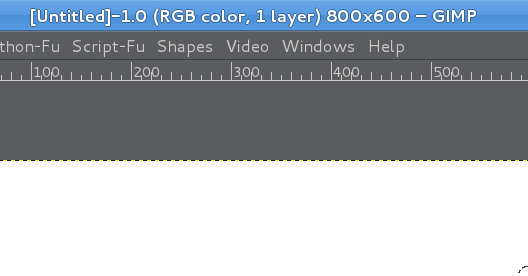
When you use the crop tool, set it to the size of your original layer which shows at the top of your gimp and in the screenshot below. click crop tool > fixed > size
> 800x600.

Image

_________________
Image


Top
 Profile  
 

 Post subject: Re: gramg support thread
PostPosted: Fri Mar 08, 2013 6:08 pm  (#28) 
Offline
GimpChat Member
User avatar

Joined: Feb 20, 2013
Posts: 1153
I want to do the opposite...I want to paste the new size image.


Top
 Profile  
 
 Post subject: Re: gramg support thread
PostPosted: Fri Mar 08, 2013 6:22 pm  (#29) 
Offline
GimpChat Member
User avatar

Joined: Feb 20, 2013
Posts: 1153
I figured it out...'paste as new image', but then it is not a part of the layers, which is okay, I guess.


Top
 Profile  
 
 Post subject: Re: gramg support thread
PostPosted: Fri Mar 08, 2013 10:53 pm  (#30) 
Offline
GimpChat Member
User avatar

Joined: Feb 20, 2013
Posts: 1153
Can anyone point me to a thread that explains how to open a font for use in gimp without downloading it to my computer. I currently keep my fonts on a memory stick, although I do have many on my computer too, and don't want to load more on.


Top
 Profile  
 
Display posts from previous:  Sort by  
Post new topic Reply to topic  [ 57 posts ]  Go to page Previous  1, 2, 3, 4, 5, 6  Next

All times are UTC - 5 hours [ DST ]


Who is online

Users browsing this forum: No registered users and 2 guests


You cannot post new topics in this forum
You cannot reply to topics in this forum
You cannot edit your posts in this forum
You cannot delete your posts in this forum
You cannot post attachments in this forum

Search for:
Jump to:  

* Login   * Subscribe to RSS Feed


Powered by phpBB © 2000, 2002, 2005, 2007 phpBB Group