It is currently Sun Aug 09, 2026 9:52 am


All times are UTC - 5 hours [ DST ]


Post new topic Reply to topic  [ 13 posts ] 
Author Message
 Post subject: Reorganization of filters tree
PostPosted: Thu Jun 27, 2013 3:05 pm  (#1) 
Offline
GimpChat Member
User avatar

Joined: Jan 03, 2011
Posts: 1656
Hello friends,

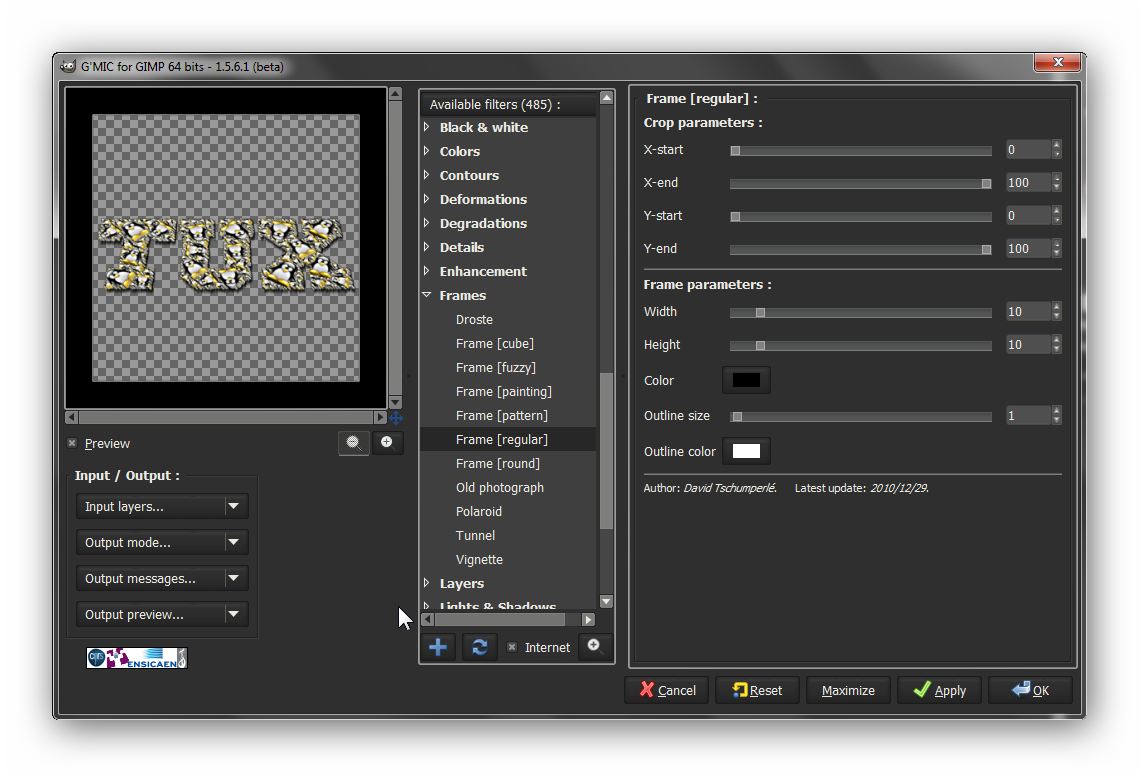
I've done some modifications today and re-organized the filters tree in the G'MIC plug-in for GIMP.
We have more top-level folders now, and less filters in each folder.
I think (and hope) this is more clear like this.

None of the existing filters have been removed during the operation, if you really don't find one filter you were used to, you can look at the filter list here and probably find it back : http://gmic.sourceforge.net/gimp_filters.txt

Cheers,

David.


Share on Facebook Share on Twitter Share on Orkut Share on Digg Share on MySpace Share on Delicious Share on Technorati
Top
 Post subject: Re: Reorganization of filters tree
PostPosted: Thu Jun 27, 2013 3:24 pm  (#2) 
Offline
GimpChat Member
User avatar

Joined: Sep 24, 2010
Posts: 12827
Just refresh; have no beef with that decision David. :)

_________________
Lyle

Psalm 109:8

Image


Top
 Post subject: Re: Reorganization of filters tree
PostPosted: Thu Jun 27, 2013 5:46 pm  (#3) 
Offline
Global Moderator
User avatar

Joined: May 16, 2010
Posts: 16153
Thanks David.
I refreshed and lost one filter. Not sure which one though.

_________________
Image


Top
 Post subject: Re: Reorganization of filters tree
PostPosted: Fri Jun 28, 2013 4:51 am  (#4) 
Offline
GimpChat Member
User avatar

Joined: Jan 20, 2013
Posts: 14831
Location: roma, italy
Nice enhancement, David, thanks!
Just one (silly? maybe..) question: is there a possibility to have a sub-menu under a menu?
This also could -imo- improve readability of the functions menu.
Small examples:
- under Colors a sub-menu Mixer
- under Deformations a sub-meu Kaleidoscope
and so on, there are many ...

_________________
"Where am I ?"


Top
 Post subject: Re: Reorganization of filters tree
PostPosted: Fri Jun 28, 2013 5:10 am  (#5) 
Offline
GimpChat Member
User avatar

Joined: Jan 03, 2011
Posts: 1656
Yes dinasset, this is possible.
But I don't like to use this too much because it would imply more clicks to access to the desired filter, and I think this could be more a drawback than an advantage.


Top
 Post subject: Re: Reorganization of filters tree
PostPosted: Fri Jun 28, 2013 8:03 am  (#6) 
Offline
GimpChat Member
User avatar

Joined: Jan 20, 2013
Posts: 14831
Location: roma, italy
I agree.
Maybe you can use it -in a future rearrangement- only where filters inside a menu are too many.
When I was young (a lot of time ago...) there was a kind of golden rule in software development:
- "when you create menus, remember that a human being is prone to detect very quickly and easily up to 7 entries, with too many attention diminishes..."
probably today our minds are more efficient than yesterday, but maybe a limit of around 10 could be useful...what do you think about?

_________________
"Where am I ?"


Top
 Post subject: Re: Reorganization of filters tree
PostPosted: Fri Jun 28, 2013 9:41 am  (#7) 
Offline
GimpChat Member
User avatar

Joined: Sep 22, 2012
Posts: 2089
Location: US
David, i'm not using GMIC every day to navigate it blindfolded.
It's hard to find some filters i've come to like amongst hundreds of other filters.
I mark them as Favorites but after every new version release my favs are gone.
Can the list of favorite filters somehow be passed on new gmic config file or a pen with
piece of paper is the only option here?


Top
 Post subject: Re: Reorganization of filters tree
PostPosted: Fri Jun 28, 2013 9:57 am  (#8) 
Offline
GimpChat Member

Joined: Aug 05, 2011
Posts: 606
Location: limestone,ny
I couldn't find 1 filter but looks like it had been renamed to kaleidoscope (symmetry)
I also can't resize the window anymore
Gimp 2.8.4 64

Image


Top
 Post subject: Re: Reorganization of filters tree
PostPosted: Fri Jun 28, 2013 7:22 pm  (#9) 
Offline
GimpChat Member

Joined: Apr 12, 2010
Posts: 5870
K1TesseraEna wrote:
David, i'm not using GMIC every day to navigate it blindfolded.
It's hard to find some filters i've come to like amongst hundreds of other filters.
I mark them as Favorites but after every new version release my favs are gone.
Can the list of favorite filters somehow be passed on new gmic config file or a pen with
piece of paper is the only option here?


This should not happen, your list of fave should be preserved , new gmic install will not delete previous list

the place where is your gmic fav list depend of your OS ,it is different in linux, xp,vista 7 and 8

in linux is a hidden file in home
in xp is a file in ...Document and settings/YourName /AppData
in vista ,7 and 8 in ...Users/YourName /AppData/roaming

quite ago on Windows it was a change (it was removed the dot in front of the filename ) and only them previous Fav file were no more usable

to recover that old gmic fav definition file all what needed is remove the dot before the name,
anyway with the time several filter were changed and some old fav may be broken by updates


But in case you have some old preset you think really worth to be resurrected you may post it and we may try

_________________
My 3D Gallery on Deviantart http://photocomix2.deviantart.com/
Main gallery http://www.flickriver.com/photos/photocomix-mandala/
Mandala and simmetry http://www.flickriver.com/photos/photocomix_mandala/

Image

Mrs Wilbress


Top
 Post subject: Re: Reorganization of filters tree
PostPosted: Fri Jun 28, 2013 8:17 pm  (#10) 
Offline
Global Moderator
User avatar

Joined: May 16, 2010
Posts: 16153
Yep my faves list is located here in Windows Vista 32 bit.
C:\Users\rod\AppData\Roaming

_________________
Image


Top
 Post subject: Re: Reorganization of filters tree
PostPosted: Fri Jun 28, 2013 8:45 pm  (#11) 
Offline
GimpChat Member
User avatar

Joined: Nov 16, 2011
Posts: 5127
Location: Metro Vancouver, BC
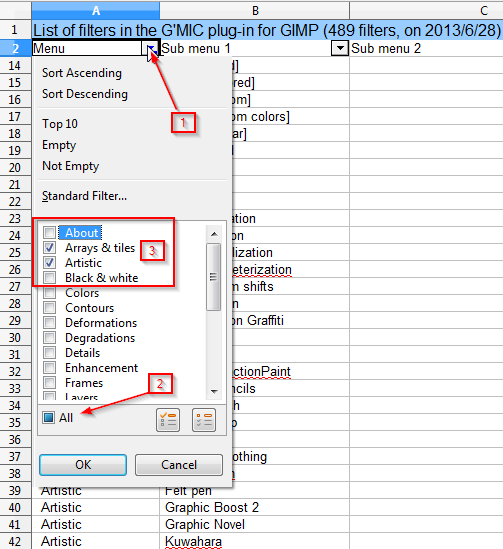
G'MIC Menu spreadsheet with sort by menu.
List of filters in the G'MIC plug-in for GIMP (489 filters, on 2013/6/28)
If your unfamiliar with using data sort.
1. Open the drop down menu.
2. Toggle All off.
3. Check menu(s).

Image


Attachments:
File comment: G'MIC Menu Spreadsheet
gmic_filters_1560x.zip [24.64 KiB]
Downloaded 93 times

_________________
Image
Gimp 2.8.18, Linux, median user
Gimp Chat Tutorials Index
Spirit Bear (Kermode)
Top
 Post subject: Re: Reorganization of filters tree
PostPosted: Fri Jun 28, 2013 8:48 pm  (#12) 
Offline
GimpChat Member
User avatar

Joined: Sep 22, 2012
Posts: 2089
Location: US
Maybe because i am using uninstaller with advanced clean-up options my AppData folder was being swept or by some
other reason, but my favs would always disappear. I'm having a problem with 64-bit version of gmic (http://gimpchat.com/viewtopic.php?f=7&t=7617&start=50) and before I re-installed the updated version of gmic I saw gmic config files in the AppData folder


Top
 Post subject: Re: Reorganization of filters tree
PostPosted: Fri Jun 28, 2013 9:06 pm  (#13) 
Offline
Global Moderator
User avatar

Joined: May 16, 2010
Posts: 16153
Odinbc wrote:
G'MIC Menu spreadsheet with sort by menu.
List of filters in the G'MIC plug-in for GIMP (489 filters, on 2013/6/28)
If your unfamiliar with using data sort.
1. Open the drop down menu.
2. Toggle All off.
3. Check menu(s).

[ Image ]


Cool. Thanks Odin. :)

_________________
Image


Top
Post new topic Reply to topic  [ 13 posts ] 

All times are UTC - 5 hours [ DST ]


* Login  


Powered by phpBB3 © phpBB Group