It is currently Sat Jun 27, 2026 1:16 am


All times are UTC - 5 hours [ DST ]


Post new topic Reply to topic  [ 36 posts ]  Go to page 1, 2  Next
Author Message
 Post subject: Re: Gmic-Graphic Novel- new version
PostPosted: Fri Apr 22, 2011 4:05 pm  (#11) 
Offline
GimpChat Member

Joined: Apr 12, 2010
Posts: 5870
2 ton, self quote from my first message

Quote:
To get the filter open Gmic enter in About/additional Filter menu ,there enable my source (PhotoComix Filters)...then click for filter update


so no need anymore to create/edit a gmic file, "filter update" (or refresh filters or how is wrote in English) is a button close to the preview windows just below the filter list

_________________
My 3D Gallery on Deviantart http://photocomix2.deviantart.com/
Main gallery http://www.flickriver.com/photos/photocomix-mandala/
Mandala and simmetry http://www.flickriver.com/photos/photocomix_mandala/

Image

Mrs Wilbress


Top
 Post subject: Re: Gmic-Graphic Novel- new version
PostPosted: Fri Apr 22, 2011 4:07 pm  (#12) 
Offline
GimpChat Member
User avatar

Joined: Apr 08, 2010
Posts: 5420
Location: Northwest Ohio
I have tried to click that, but nothing seems to happen! How can I tell if updates and new filters have been added? Right now it says I have 444 filters.


Top
 Post subject: Re: Gmic-Graphic Novel- new version
PostPosted: Fri Apr 22, 2011 4:20 pm  (#13) 
Offline
GimpChat Member

Joined: Apr 12, 2010
Posts: 5870
Did you first checked the boxes in About/additional filters ?

_________________
My 3D Gallery on Deviantart http://photocomix2.deviantart.com/
Main gallery http://www.flickriver.com/photos/photocomix-mandala/
Mandala and simmetry http://www.flickriver.com/photos/photocomix_mandala/

Image

Mrs Wilbress


Top
 Post subject: Re: Gmic-Graphic Novel- new version
PostPosted: Fri Apr 22, 2011 4:20 pm  (#14) 
Offline
GimpChat Member
User avatar

Joined: Mar 02, 2011
Posts: 1850
Location: Michigan
PC, for me in 2.7 it will not let me update, so I prefer to just edit the G'MIC File, because well updating G'MIC manually doesn't get your guys ones, just new ones from the Whole G'MIC build.
Could someone post the code here? Spoiler would be great :D

_________________
Image
I'm back I think


Top
 Post subject: Re: Gmic-Graphic Novel- new version
PostPosted: Fri Apr 22, 2011 4:22 pm  (#15) 
Offline
GimpChat Member

Joined: Apr 12, 2010
Posts: 5870
################################################################################
#@gimp *Graphic Novel* : gimp_graphic_novelfx, gimp_graphic_novelfx
#@gimp : sep = separator ()
#@gimp : note = note("Apply Local Normalization")
#@gimp : SKIP this step = bool(false)

#@gimp : sep = separator ()
#@gimp : note = note(" Local Normalization Controls")
#@gimp : LN Amplititude = float(2,0,60)
#@gimp : LN Size = float(6,0,64)
#@gimp : LN Neightborhood-Smoothness = float(5,0,40)
#@gimp : LN Average-Smoothness = float(20,0,40)
#@gimp : sep = separator()

#@gimp : SKIP all other steps = bool(false)

#@gimp : sep = separator()
#@gimp : note = note(" Pencil Options")
#@gimp : Pencil Size = float(0.12,0,4)
#@gimp : Pencil Amplitude = float(14,0,200)
#@gimp : sep = separator()

#@gimp : SKIP all other steps = bool(false)

#@gimp : sep = separator()

#@gimp : Activate "Pencil Smoother" = bool(false)
#@gimp : note = note(" If unchecked the 3 sliders below are disabled ")
#@gimp : sep = separator()
#@gimp : Pencil Smoother Sharpness = float(0.5,0,2)
#@gimp : Pencil Smoother Edge Protection = float(0.54,0,1)
#@gimp : Pencil Smoother Smoothness = float(1.12,0,10)

#@gimp : sep = separator()

#@gimp : SKIP all other steps = bool(false)

#@gimp : sep = separator ()
#@gimp : sep = separator()
#@gimp : note = note ("Boost Merging Options")
#@gimp : Swap Layers = bool (true)
#@gimp : BOOST Merging Option = choice("Overlay","Multiply","Soft light","Color Burn","Darken","Stamp","Hard Light","Value","Grain Merge","Freeze")
#@gimp : Opacity = float(1,0,1)
#@gimp : sep = separator ()
#@gimp : Add Painter's Touch = bool(true)

#@gimp : sep = separator ()
#@gimp : Painter's Touch Sharpness = float(0.5,0,2)
#@gimp : Painter's Edge Protection Flow = float(0.54,0,1)
#@gimp : Painter's Smoothness =float(0.78,0,10)
#@gimp : sep = separator(), note = note("<small>Author : <i>PhotoComiX</i>. Latest update : <i>2011/04/24</i>.</small>")
#@gimp : note = link("Filter explained here","http://www.gimpchat.com/viewtopic.php?f=9&t=1582")
gimp_graphic_novelfx :
-repeat @# -l[$>] -split_opacity -l[0]
-if {$1==0} -gimp_normalize_local $2,$3,$4,$5,1,3,0 -elif {$1==1} -gimp_do_nothing -endif
-if {$6==0} --gimp_pencilbw $7,$8,0,0,0 -endif
-if {$9==1} -keep[-1] -break -endif
-if {$10==1} -gimp_anisotropic_smoothing[-1] 60,$11,$12,$13,1.1,0.8,30,2,0,1,1,0,1,0 -endif
-if {$14==1} -keep[-1] -break -endif
-if {$15==1} -reverse -endif
#choice ("Overlay","Multiply","Soft light","Color Burn,Darken,Stamp,Hard #Light,Value,Grain Merge,Freeze )
-if {$16==0} -gimp_compose_overlay[-1,0] $17
-elif {$16==1} -gimp_compose_multiply[-1,0] $17
-elif {$16==2} -gimp_compose_softlight[-1,0] $17
-elif {$16==3} -gimp_compose_colorburn[-1,0] $17
-elif {$16==4} -gimp_compose_darken[-1,0] $17
-elif {$16==5} -gimp_compose_stamp[-1,0] $17
-elif {$16==6} -gimp_compose_hardlight[-1,0] $17
-elif {$16==7} -reverse[1,0] -gimp_compose_value[-1,0] $17,0
-elif {$16==8} -gimp_compose_grainmerge[-1,0] $17
-elif {$16==8} -gimp_compose_freeze[-1,0] $17 -endif
-if {$18==1} -gimp_anisotropic_smoothing 60,$19,$20,$21,1.1,0.8,30,2,0,1,1,0,1,0 -endif

-endl -a c -endl -done

_________________
My 3D Gallery on Deviantart http://photocomix2.deviantart.com/
Main gallery http://www.flickriver.com/photos/photocomix-mandala/
Mandala and simmetry http://www.flickriver.com/photos/photocomix_mandala/

Image

Mrs Wilbress


Top
 Post subject: Re: Gmic-Graphic Novel- new version
PostPosted: Fri Apr 22, 2011 4:31 pm  (#16) 
Offline
GimpChat Member
User avatar

Joined: Mar 02, 2011
Posts: 1850
Location: Michigan
Huzah!
Gotta go or I would have messed around more
Attachment:
4-22-11 106Graphic Noveled.png
4-22-11 106Graphic Noveled.png [ 2.27 MiB | Viewed 5104 times ]

Attachment:
4-22-11 106.png
4-22-11 106.png [ 1.32 MiB | Viewed 5104 times ]

_________________
Image
I'm back I think


Top
 Post subject: Re: Gmic-Graphic Novel- new version
PostPosted: Fri Apr 22, 2011 5:55 pm  (#17) 
Offline
GimpChat Member
User avatar

Joined: Apr 08, 2010
Posts: 5420
Location: Northwest Ohio
PhotoComix wrote:
2 ton, self quote from my first message

Quote:
To get the filter open Gmic enter in About/additional Filter menu ,there enable my source (PhotoComix Filters)...then click for filter update


so no need anymore to create/edit a gmic file, "filter update" (or refresh filters or how is wrote in English) is a button close to the preview windows just below the filter list

I do not have an additional filters in my about menu and therefore do not have PhotoComix Filters either. my g'mic version is 1.4.7.0, by the way.


Top
 Post subject: Re: Gmic-Graphic Novel- new version
PostPosted: Fri Apr 22, 2011 7:57 pm  (#18) 
Offline
GimpChat Member

Joined: Apr 12, 2010
Posts: 5870
that is why
You need to update now is 1.4.9.1 and there are changes that are not backward compatible.

as example all old filters that use Value mode will give errors on 1.4.9 and on the other hand all new scripts that use Value, Lightness, Luminosity,Grain merge or grain combine mode are unusable on previous versions

this version of GN could be even be used with older gmic, but not with the option for value mode

_________________
My 3D Gallery on Deviantart http://photocomix2.deviantart.com/
Main gallery http://www.flickriver.com/photos/photocomix-mandala/
Mandala and simmetry http://www.flickriver.com/photos/photocomix_mandala/

Image

Mrs Wilbress


Top
 Post subject: Re: Gmic-Graphic Novel- new version
PostPosted: Fri Apr 22, 2011 11:24 pm  (#19) 
Offline
GimpChat Member

Joined: Apr 12, 2010
Posts: 5870
hemm...be a bit patient there is a couple of things that i want correct yet
(preview size should be 1:1 and yet i am not happy with the default )

_________________
My 3D Gallery on Deviantart http://photocomix2.deviantart.com/
Main gallery http://www.flickriver.com/photos/photocomix-mandala/
Mandala and simmetry http://www.flickriver.com/photos/photocomix_mandala/

Image

Mrs Wilbress


Top
 Post subject: Re: Gmic-Graphic Novel- new version
PostPosted: Sat Apr 23, 2011 8:08 am  (#20) 
Offline
GimpChat Member
User avatar

Joined: Apr 08, 2010
Posts: 5420
Location: Northwest Ohio
When I do update to the newest gmic, do I need to remove the old one first? Heh, I have not removed a program from a mac before, so I hope I don't create a disaster!


Top
 Post subject: Re: Gmic-Graphic Novel- new version
PostPosted: Sat Apr 23, 2011 8:28 am  (#21) 
Offline
GimpChat Member

Joined: Apr 12, 2010
Posts: 5870
2 ton , i always install my scripts and plugin from Gimp Preferences (see pinned in resource board for how to, it is very simple,even simpler then usual way ) and in that case there is no problem to unistall, it is only needed to change path

And that even allow if needed to mantain older version of plugins (only one may work, but is possible decide which just changing the path )

Anyway i can't image what may go wrong , if you remember where you placed the older version of gimp then should be not even needed to delete it first, just drop the new files there and accept overwriting is sufficent

_________________
My 3D Gallery on Deviantart http://photocomix2.deviantart.com/
Main gallery http://www.flickriver.com/photos/photocomix-mandala/
Mandala and simmetry http://www.flickriver.com/photos/photocomix_mandala/

Image

Mrs Wilbress


Top
 Post subject: Re: Gmic-Graphic Novel- new version
PostPosted: Sat Apr 23, 2011 8:36 am  (#22) 
Offline
GimpChat Member
User avatar

Joined: Apr 08, 2010
Posts: 5420
Location: Northwest Ohio
I do know exactly where my gmic file is...so overwriting might be the easiest way!


Top
 Post subject: Re: Gmic-Graphic Novel- new version
PostPosted: Sat Apr 23, 2011 8:46 am  (#23) 
Offline
GimpChat Member

Joined: Apr 12, 2010
Posts: 5870
This is the new default (changes should be effective in a few hours, i didn't updated yet the file on the server)

Graphic Novel default

Image
experiments by PhotoComiX, on Flickr

ORIGINAL

Image
Amazon Kingfisher | Chloroceryle amazona by Muchaxo, on Flickr

With a old B&W photo from the Library of Congress

Image
experiments-new default for (Gmic) Graphic Novel by PhotoComiX, on Flickr

From

Image
G.G.B. in Stutz (LOC) by The Library of Congress, on Flickr

_________________
My 3D Gallery on Deviantart http://photocomix2.deviantart.com/
Main gallery http://www.flickriver.com/photos/photocomix-mandala/
Mandala and simmetry http://www.flickriver.com/photos/photocomix_mandala/

Image

Mrs Wilbress


Top
 Post subject: Re: Gmic-Graphic Novel- new version
PostPosted: Sat Apr 23, 2011 8:48 am  (#24) 
Offline
GimpChat Member
User avatar

Joined: Mar 02, 2011
Posts: 1850
Location: Michigan
Woah I love that one on the Bird!

_________________
Image
I'm back I think


Top
 Post subject: Re: Gmic-Graphic Novel- new version
PostPosted: Sat Apr 23, 2011 9:10 am  (#25) 
Offline
Retired Staff
User avatar

Joined: May 22, 2008
Posts: 6946
Location: Somewhere in GIMP
That is very nice, PhotoComix. :hi5 :yes :bigthup

Original image here.

Image

_________________
Image
World War IV will be fought with sticks and stones. - Albert Einstein


Top
 Post subject: Re: Gmic-Graphic Novel- new version
PostPosted: Sat Apr 23, 2011 9:53 am  (#26) 
Offline
GimpChat Member

Joined: Apr 12, 2010
Posts: 5870
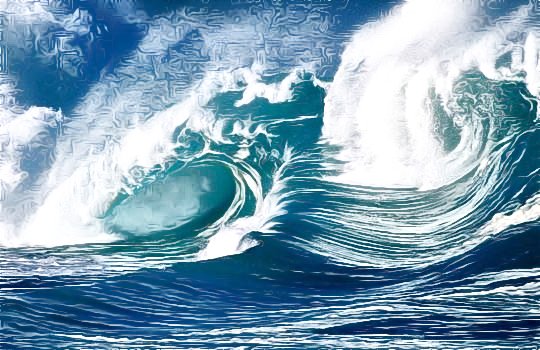
O

the new default will be on the server in a few hours i just checking last detail

could effect on the sea, but anyway i chose as default something more smooth (but hopefully with still neat edges )

_________________
My 3D Gallery on Deviantart http://photocomix2.deviantart.com/
Main gallery http://www.flickriver.com/photos/photocomix-mandala/
Mandala and simmetry http://www.flickriver.com/photos/photocomix_mandala/

Image

Mrs Wilbress


Top
 Post subject: Re: Gmic-Graphic Novel- new version
PostPosted: Sat Apr 23, 2011 9:54 am  (#27) 
Offline
GimpChat Member

Joined: Apr 12, 2010
Posts: 5870
O

the new default will be on the server in a few hours i just checking last detail

could effect on the sea, but anyway i chose as default something more smooth (but hopefully with still neat edges )

so next time you refresh filters should be there, with a 1:1 preview

DONE !!

_________________
My 3D Gallery on Deviantart http://photocomix2.deviantart.com/
Main gallery http://www.flickriver.com/photos/photocomix-mandala/
Mandala and simmetry http://www.flickriver.com/photos/photocomix_mandala/

Image

Mrs Wilbress


Top
 Post subject: Re: Gmic-Graphic Novel- new version
PostPosted: Sat Apr 23, 2011 9:56 pm  (#28) 
Offline
GimpChat Member
User avatar

Joined: Apr 18, 2011
Posts: 620
Location: New York
well, I just discovered GMIC (where the HECK have I been????)

installed it and made this using two layers each with two different effects. I tried to get something subtle


Image
North Hempstead-00072 by cecilia fx, on Flickr

_________________
Ubuntu 24.04.1, Kernel i686, 6.8.0-52-generic
python3 v3.12.3 ----- GIMP - ver 2.10.38


Top
 Post subject: Re: Gmic-Graphic Novel- new version
PostPosted: Sat Apr 23, 2011 9:57 pm  (#29) 
Offline
GimpChat Member
User avatar

Joined: Apr 08, 2010
Posts: 5420
Location: Northwest Ohio
I really like what you did with your pic!


Top
 Post subject: Re: Gmic-Graphic Novel- new version
PostPosted: Sat Apr 23, 2011 9:59 pm  (#30) 
Offline
GimpChat Member

Joined: Apr 12, 2010
Posts: 5870
very delicate cecilia ,very nice !

_________________
My 3D Gallery on Deviantart http://photocomix2.deviantart.com/
Main gallery http://www.flickriver.com/photos/photocomix-mandala/
Mandala and simmetry http://www.flickriver.com/photos/photocomix_mandala/

Image

Mrs Wilbress


Top
Post new topic Reply to topic  [ 36 posts ]  Go to page 1, 2  Next

All times are UTC - 5 hours [ DST ]


* Login  


Powered by phpBB3 © phpBB Group