It is currently Mon Jul 06, 2026 12:15 am


All times are UTC - 5 hours [ DST ]


Post new topic Reply to topic  [ 46 posts ]  Go to page Previous  1, 2, 3  Next
Author Message
 Post subject: Re: Another way to make a pencil portrait.
PostPosted: Mon Dec 10, 2012 11:01 am  (#21) 
Offline
GimpChat Member
User avatar

Joined: Dec 02, 2012
Posts: 203
Location: Cantabria, Spain
Steeno:

I'm more used to reading or listening WTF. In spanish we don't use acronymes usually.

Thanks.

_________________
Image


My Gimp rides on Antergos (Arch), Linux Mint, Debian and Fedora


Top
 Post subject: Re: Another way to make a pencil portrait.
PostPosted: Mon Dec 10, 2012 11:16 am  (#22) 
Offline
GimpChat Member
User avatar

Joined: Apr 07, 2010
Posts: 14182
:lol :oops:

_________________
Image


Top
 Post subject: Re: Another way to make a pencil portrait.
PostPosted: Mon Dec 10, 2012 12:57 pm  (#23) 
Offline
GimpChat Member
User avatar

Joined: Apr 07, 2010
Posts: 14182
@jamac4k, I deleted the old pdf and made a new one with the GMIC screen shots included. It should be a little more clear with those in there.


Attachments:
pencil portrail.pdf [2.05 MiB]
Downloaded 373 times

_________________
Image
Top
 Post subject: Re: Another way to make a pencil portrait.
PostPosted: Mon Dec 10, 2012 2:10 pm  (#24) 
Offline
GimpChat Member
User avatar

Joined: Apr 07, 2010
Posts: 14182
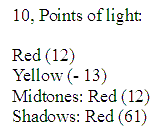
Ok, I tried the pdf and everythang went fine until I got to the very last step 10, how can I set red to 12 then set it to 12 again. Anyway, this is what I ended up with. Thank you for the tutorial. :yes

Image

_________________
Image


Top
 Post subject: Re: Another way to make a pencil portrait.
PostPosted: Mon Dec 10, 2012 3:43 pm  (#25) 
Offline
GimpChat Member
User avatar

Joined: Dec 02, 2012
Posts: 203
Location: Cantabria, Spain
Each pic is a world.

Try playing with red and yellow in midtones and lights. Other way is use Colorize or Hue and saturation instead Color balance.

All steps, exclude the last, were thought to apply to the most of pics, but allways we'll have to do anything to obtain what have in our mind.

_________________
Image


My Gimp rides on Antergos (Arch), Linux Mint, Debian and Fedora


Top
 Post subject: Re: Another way to make a pencil portrait.
PostPosted: Tue Dec 11, 2012 8:37 am  (#26) 
Offline
GimpChat Member
User avatar

Joined: Jan 03, 2011
Posts: 1656
Very nice tutorial Jamack4k.
I've tried to do a G'MIC script that does all the steps you describe automatically, and added then a new filter 'Black & White / Pencil portrait' that looks like this :

Image

You can get it by 'Updating' your filters. Hope you'll like it!


Top
 Post subject: Re: Another way to make a pencil portrait.
PostPosted: Tue Dec 11, 2012 8:39 am  (#27) 
Offline
GimpChat Member
User avatar

Joined: Apr 07, 2010
Posts: 14182
I like what you did there very much Ronounours. This is my results with Angelina.

Image

_________________
Image


Top
 Post subject: Re: Another way to make a pencil portrait.
PostPosted: Tue Dec 11, 2012 2:56 pm  (#28) 
Offline
GimpChat Member
User avatar

Joined: Sep 24, 2010
Posts: 12788
Wow David. Excellent result. I knew there was a way to get G'MIC to do it all. Thanks. :)


Attachments:
DSC00422crp_pncl.JPG
DSC00422crp_pncl.JPG [ 465.67 KiB | Viewed 4573 times ]

_________________
Lyle

Psalm 109:8

Image
Top
 Post subject: Re: Another way to make a pencil portrait.
PostPosted: Tue Dec 11, 2012 2:59 pm  (#29) 
Offline
GimpChat Member
User avatar

Joined: Apr 07, 2010
Posts: 14182
You did your dad proud again Lyle, he must have quite an album full by now.

_________________
Image


Top
 Post subject: Re: Another way to make a pencil portrait.
PostPosted: Tue Dec 11, 2012 3:11 pm  (#30) 
Offline
GimpChat Member
User avatar

Joined: Nov 16, 2011
Posts: 5127
Location: Metro Vancouver, BC
Lyle, That's one of the better ones you've done of your Dad, it has a very classic look :bigthup

_________________
Image
Gimp 2.8.18, Linux, median user
Gimp Chat Tutorials Index
Spirit Bear (Kermode)


Top
 Post subject: Re: Another way to make a pencil portrait.
PostPosted: Tue Dec 11, 2012 4:12 pm  (#31) 
Offline
GimpChat Member

Joined: Nov 28, 2012
Posts: 85
Location: France
jamac4k wrote:
Steeno:

I'm more used to reading or listening WTF. In spanish we don't use acronymes usually.

Thanks.


In french too, but it's the preferred of my manager :cool


Top
 Post subject: Re: Another way to make a pencil portrait.
PostPosted: Tue Dec 11, 2012 5:10 pm  (#32) 
Offline
GimpChat Member
User avatar

Joined: Sep 24, 2010
Posts: 12788
Appreciate the comments. Dad still have his glass version hanging on the pin board (has a lot of pictures of grand-kids, great-grand-kids and stuff on his pinboard). :)

_________________
Lyle

Psalm 109:8

Image


Top
 Post subject: Re: Another way to make a pencil portrait.
PostPosted: Tue Dec 25, 2012 9:38 am  (#33) 
Offline
GimpChat Member

Joined: Oct 31, 2011
Posts: 112
Sorry, I can't follow the tutorial in the step where we apply sketch and hard sketch (and afterwards).

1. what layer should I apply skecth and hard sketch? visible? so, in the visible layer, I apply hard sketch, and then sketch. is that correct?
2. if that's correct, then I have 4 layers: visible, L1, L2, and background (the original image). that's why I don't understand when we apply Hard Sketch : Mode Multiply , 50 % Opacity; Sketch : mode Lighten only , 50% opacity; etc; because I don't have layer named "Hard Sketch" and "Sketch"

Thank you for your help :D


Top
 Post subject: Re: Another way to make a pencil portrait.
PostPosted: Tue Dec 25, 2012 10:08 am  (#34) 
Offline
GimpChat Member
User avatar

Joined: Apr 07, 2010
Posts: 14182
Here is a screen shot of the layers, after you do the sketch, you rename your layer to sketch, then hard sketch, It makes it easier to know what layer you should be on.

Image

_________________
Image


Top
 Post subject: Re: Another way to make a pencil portrait.
PostPosted: Tue Dec 25, 2012 1:50 pm  (#35) 
Offline
GimpChat Member
User avatar

Joined: Dec 02, 2012
Posts: 203
Location: Cantabria, Spain
Begining on Visible layer:

You must work the layers in G'mic with Output mode set in: New layer(s).
G'mic named each layer according to the applied filter.

Hard Sketch and Sketch applied with Visible layer selected with the settings ut supra dicitur.
Ink wash applied with Blackground or L1 selected.

From bottom to top:
Ink wash Visible Hard Sketch Sketch

Set layers mode and opacities.

Go on tut.

Look screencap what what Molly has posted.

_________________
Image


My Gimp rides on Antergos (Arch), Linux Mint, Debian and Fedora


Top
 Post subject: Re: Another way to make a pencil portrait.
PostPosted: Wed Dec 26, 2012 1:26 am  (#36) 
Offline
GimpChat Member

Joined: Oct 31, 2011
Posts: 112
Thank you jamac4k !

jamac4k wrote:
Begining on Visible layer:

From bottom to top:
Ink wash Visible Hard Sketch Sketch

Set layers mode and opacities.

Go on tut.

Look screencap what what Molly has posted.


Top
 Post subject: Re: Another way to make a pencil portrait.
PostPosted: Wed Dec 26, 2012 1:27 am  (#37) 
Offline
GimpChat Member

Joined: Oct 31, 2011
Posts: 112
Thank you molly! I want to upload my result, but my Internet is having problem. It doesn't let me upload anything to the Internet :(

molly wrote:
Here is a screen shot of the layers, after you do the sketch, you rename your layer to sketch, then hard sketch, It makes it easier to know what layer you should be on.

Image


Top
 Post subject: Re: Another way to make a pencil portrait.
PostPosted: Wed Dec 26, 2012 5:16 am  (#38) 
Offline
GimpChat Member
User avatar

Joined: Apr 07, 2010
Posts: 14182
Image


Are you using this upload file button?

_________________
Image


Top
 Post subject: Re: Another way to make a pencil portrait.
PostPosted: Fri May 17, 2013 7:02 pm  (#39) 
Offline
Global Moderator
User avatar

Joined: May 16, 2010
Posts: 16079
Nice tutorial. :)
I had assumed blacken meant to darken so i used darken mode but it turned out ok.
Thanks for the lesson in G'MIC! :bigthup

I used the same image you did by the way. :hehe

Image

_________________
Image


Top
 Post subject: Re: Another way to make a pencil portrait.
PostPosted: Mon May 20, 2013 4:23 pm  (#40) 
Offline
Administrator
User avatar

Joined: Aug 10, 2012
Posts: 14117
Location: Native to NYC living in Arizona, Gimp 2.8 - 3.0, Win 11 PC.
I was trying to follow along with your tutorial, but most of the values for the filter seem to be different form what I can apply. There seem to be more values then I have inputs for.

So I can't complete the tutorial. :(

I do like your results, but the values need to be more clearly defined in order for me to get it right.


I'm going to try the tutorial again using the 'pencil portrail.pdf'. Maybe with the pdf, I'll be able to sort things out better.

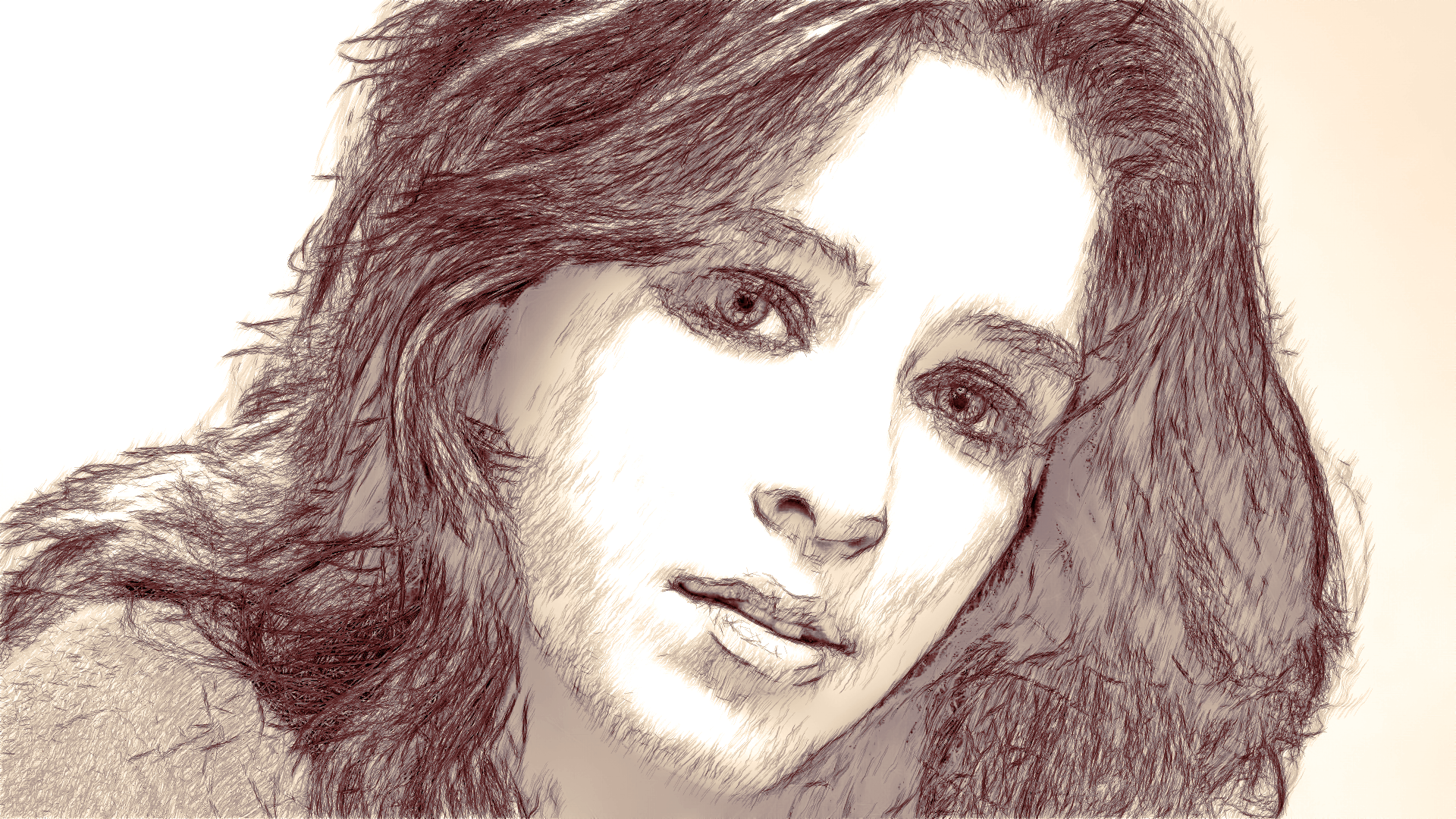
The 'pdf' was good, but I could not complete the color-balance at the end, because I could not understand the settings needed to create the color in the tutorial.
Image

_________________
Image
"A wise man learns more from a foolish question than a fool can learn from a wise answer"
Image


Top
Post new topic Reply to topic  [ 46 posts ]  Go to page Previous  1, 2, 3  Next

All times are UTC - 5 hours [ DST ]


* Login  


Powered by phpBB3 © phpBB Group