It is currently Tue Jun 09, 2026 12:39 pm


All times are UTC - 5 hours [ DST ]


Post new topic Reply to topic  [ 63 posts ]  Go to page 1, 2, 3, 4  Next
Author Message
 Post subject: Re: PhotoMaster's Rubiks Cube Tutorial
PostPosted: Sun Aug 29, 2010 4:06 pm  (#11) 
Offline
GimpChat Member
User avatar

Joined: Jul 04, 2010
Posts: 2253
Location: Retired Moderator Slowly Returning to the Living.
I have numerous butterfly pix, because I love them. I would love to see a glasswing!! Everyone's work is superb!

_________________
Artists aren't crazy! We're eccentric! ~G.M. Ross

Image

My Sigs = My Photos
Check out my work at http://www.flickr.com/photos/photomastergreg.


Top
 Post subject: Re: PhotoMaster's Rubiks Cube Tutorial
PostPosted: Sun Aug 29, 2010 7:55 pm  (#12) 
Offline
GimpChat Member
User avatar

Joined: Apr 08, 2010
Posts: 5420
Location: Northwest Ohio
....because the tut is superb!


Top
 Post subject: Re: PhotoMaster's Rubiks Cube Tutorial
PostPosted: Sun Aug 29, 2010 8:18 pm  (#13) 
Offline
Retired Staff
User avatar

Joined: May 22, 2008
Posts: 6946
Location: Somewhere in GIMP
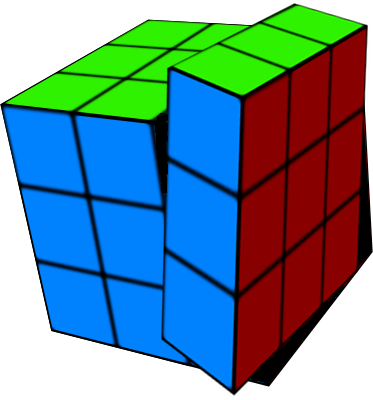
Trying to make it look like one of the layers is turned. Perspective isn't right.

Image

_________________
Image
World War IV will be fought with sticks and stones. - Albert Einstein


Top
 Post subject: Re: PhotoMaster's Rubiks Cube Tutorial
PostPosted: Sun Aug 29, 2010 8:42 pm  (#14) 
Offline
GimpChat Member
User avatar

Joined: Apr 08, 2010
Posts: 5420
Location: Northwest Ohio
hee hee, next you will have the puzzle all twisted up and the faces all mixed up on different sides...ohhhh, and animate it to solve itself. XD
p.s. love love love your zen saying!


Top
 Post subject: Re: PhotoMaster's Rubiks Cube Tutorial
PostPosted: Mon Aug 30, 2010 9:13 am  (#15) 
Offline
Global Moderator
User avatar

Joined: May 16, 2010
Posts: 16023
There is a new plug-in script called EZ Perspective that may work for you. =)
You can go here to get the text python file, just replace the txt extension with py and make sure
its executable.Throw it in your plug-ins folder and restart Gimp. =)
http://registry.gimp.org/files/ez-perspective.py_3.txt

You will find in under Filters/Distorts/EZ Perspective

_________________
Image


Top
 Post subject: Re: PhotoMaster's Rubiks Cube Tutorial
PostPosted: Mon Aug 30, 2010 11:29 am  (#16) 
Offline
GimpChat Member
User avatar

Joined: Jul 04, 2010
Posts: 2253
Location: Retired Moderator Slowly Returning to the Living.
I'll have to try and figure it out. I think it would require two differently rendered cubes, taking part of one for the other.

_________________
Artists aren't crazy! We're eccentric! ~G.M. Ross

Image

My Sigs = My Photos
Check out my work at http://www.flickr.com/photos/photomastergreg.


Top
 Post subject: Re: PhotoMaster's Rubiks Cube Tutorial
PostPosted: Mon Aug 30, 2010 11:39 am  (#17) 
Offline
Retired Staff
User avatar

Joined: May 22, 2008
Posts: 6946
Location: Somewhere in GIMP
PhotoMaster wrote:
I'll have to try and figure it out. I think it would require two differently rendered cubes, taking part of one for the other.

Ah! Didn't think of using two separate cubes. Can tweak the orientations. Good idea there, Greg. :idea:

_________________
Image
World War IV will be fought with sticks and stones. - Albert Einstein


Top
 Post subject: Re: PhotoMaster's Rubiks Cube Tutorial
PostPosted: Mon Aug 30, 2010 2:03 pm  (#18) 
Offline
GimpChat Member

Joined: Aug 27, 2010
Posts: 491
Completed this last night and am thrilled with the result, thanks in very large part to the detail of the tutorial. Tried to make the Rubik's Revenge cube (the one with 16 squares per side) but am now getting a map object crash every time I attempt to map the layers to a box in GIMP 2.6.10 ... If anyone is familiar with this and might be able to help identify the problem or a solution I would greatly appreciate it.


Top
 Post subject: Re: PhotoMaster's Rubiks Cube Tutorial
PostPosted: Mon Aug 30, 2010 2:58 pm  (#19) 
Offline
Retired Staff
User avatar

Joined: May 22, 2008
Posts: 6946
Location: Somewhere in GIMP
It comes up with the error message all the time. Just close the error message and continue what you are doing. It's one of my biggest grumps about that filter; the other one is the inability to resize the preview.

It's old and crotchety but will work.

_________________
Image
World War IV will be fought with sticks and stones. - Albert Einstein


Top
 Post subject: Re: PhotoMaster's Rubiks Cube Tutorial
PostPosted: Mon Aug 30, 2010 5:24 pm  (#20) 
Offline
GimpChat Member

Joined: Aug 27, 2010
Posts: 491
Oregonian wrote:
It comes up with the error message all the time. Just close the error message and continue what you are doing. It's one of my biggest grumps about that filter; the other one is the inability to resize the preview.

It's old and crotchety but will work.


I have tried that however it continues to reproduce the same error. I am almost certain it is a conflict with a plugin or a script I added after the initial installation. The three I added were the FX-Foundry scripts, the Script-Fu layer effects and the Kward1979uk glass effects scripts. I suppose sense would dictate I remove those one by one and see if that resolves the issue. Then again, sense is not my strong suite.


Top
 Post subject: Re: PhotoMaster's Rubiks Cube Tutorial
PostPosted: Mon Aug 30, 2010 8:01 pm  (#21) 
Offline
Retired Staff
User avatar

Joined: May 22, 2008
Posts: 6946
Location: Somewhere in GIMP
Mike wrote:
I have tried that however it continues to reproduce the same error. I am almost certain it is a conflict with a plugin or a script I added after the initial installation. The three I added were the FX-Foundry scripts, the Script-Fu layer effects and the Kward1979uk glass effects scripts. I suppose sense would dictate I remove those one by one and see if that resolves the issue. Then again, sense is not my strong suite.
I think your suspicions may be correct. I tried a 4x4 grid, even made the image larger (600x600px) to see if it would crash. It came out fine - no crash. Here's the 4x4 one I made plus I've attached the 4x4 xcf file if someone else would like to give it a try.

Image


Attachments:
rubik_4x4_grid.xcf [66.33 KiB]
Downloaded 242 times

_________________
Image
World War IV will be fought with sticks and stones. - Albert Einstein
Top
 Post subject: Re: PhotoMaster's Rubiks Cube Tutorial
PostPosted: Fri Dec 31, 2010 4:39 pm  (#22) 
Offline
GimpChat Member
User avatar

Joined: Dec 31, 2010
Posts: 6
Hi Greg,

what a wonderful Tut - I have a question to you.

What's the name of the font in your Gimp themes?

Loves from Germany

Avarra :gimp

_________________
Image


Top
 Post subject: Re: PhotoMaster's Rubiks Cube Tutorial
PostPosted: Sat Jan 01, 2011 8:29 pm  (#23) 
Offline
GimpChat Member
User avatar

Joined: Jul 04, 2010
Posts: 2253
Location: Retired Moderator Slowly Returning to the Living.
I don't have that machine any more, but I think it might be comic sans.

_________________
Artists aren't crazy! We're eccentric! ~G.M. Ross

Image

My Sigs = My Photos
Check out my work at http://www.flickr.com/photos/photomastergreg.


Top
 Post subject: Re: PhotoMaster's Rubiks Cube Tutorial
PostPosted: Sun Jan 02, 2011 2:24 am  (#24) 
Offline
Global Moderator
User avatar

Joined: May 16, 2010
Posts: 16023
Cant you change that in your gtkrc file by placing a style in there?
I think Saul showed me how to do that in another post somewhere...

Now where did we put that....ahh yes place this in your gtkrc file in your gimp 2.0 folder in user docs

style "gimp-default-style"
{
font_name = "sans 10"
}

But i believe you would want to change that to "comic-sans 10"

_________________
Image


Top
 Post subject: Re: PhotoMaster's Rubiks Cube Tutorial
PostPosted: Sun Jan 02, 2011 3:51 am  (#25) 
Offline
Global Moderator
User avatar

Joined: May 16, 2010
Posts: 16023
Scratch that it should look like this

style "gimp-default-style"
{
font_name = "comic sans ms 10"
}

Image

_________________
Image


Top
 Post subject: Re: PhotoMaster's Rubiks Cube Tutorial
PostPosted: Sun Jan 02, 2011 5:02 am  (#26) 
Offline
GimpChat Member
User avatar

Joined: Oct 06, 2010
Posts: 4050
Nice! Thanks for the tutorial (yeah, you created this before I joined gimpchat). This was lots of fun, but for some reason my map object took 10 minutes to render a 480 x 480 image. Weird.

Image

_________________
"In order to attain the impossible, one must attempt the absurd."
~ Miguel de Cervantes


Top
 Post subject: Re: PhotoMaster's Rubiks Cube Tutorial
PostPosted: Sun Jan 02, 2011 5:22 am  (#27) 
Offline
GimpChat Member

Joined: Apr 12, 2010
Posts: 5870
btw.

i still have the code for Map to Object with a maximized preview (about 5X the actual) for gimp 2.6 as for gimp 2.7 ;)
Just in case somebody wish compile his gimp as example to try the bleeding edge versions of 2.7 (once compiled i suppose that may be shared, at least on similar distro)

_________________
My 3D Gallery on Deviantart http://photocomix2.deviantart.com/
Main gallery http://www.flickriver.com/photos/photocomix-mandala/
Mandala and simmetry http://www.flickriver.com/photos/photocomix_mandala/

Image

Mrs Wilbress


Top
 Post subject: Re: PhotoMaster's Rubiks Cube Tutorial
PostPosted: Sun Jan 02, 2011 11:20 am  (#28) 
Offline
Global Moderator
User avatar

Joined: May 16, 2010
Posts: 16023
PhotoComix wrote:
btw.

i still have the code for Map to Object with a maximized preview (about 5X the actual) for gimp 2.6 as for gimp 2.7 ;)
Just in case somebody wish compile his gimp as example to try the bleeding edge versions of 2.7 (once compiled i suppose that may be shared, at least on similar distro)


Maybe RobA will give it a go! :)
I would love to see a larger preview in IWARP, but you can get one by just selecting an area and opening IWARP.It gives you quite a nice large preview of the area you are editing.

Still it would be nice to be able to just open it and start working.Ah well back on subject ... sorry about that. :)

_________________
Image


Top
 Post subject: Re: PhotoMaster's Rubiks Cube Tutorial
PostPosted: Mon Jan 31, 2011 5:15 pm  (#29) 
Offline
GimpChat Member
User avatar

Joined: Jul 04, 2010
Posts: 2253
Location: Retired Moderator Slowly Returning to the Living.
Great intel guys!

@Oregonian - The quad idea is sweet!

@Mahvin - Hey Mahv! That is an awesome cube! Your original images are phenominal!

_________________
Artists aren't crazy! We're eccentric! ~G.M. Ross

Image

My Sigs = My Photos
Check out my work at http://www.flickr.com/photos/photomastergreg.


Top
 Post subject: Re: PhotoMaster's Rubiks Cube Tutorial
PostPosted: Mon Jan 31, 2011 8:39 pm  (#30) 
Offline
GimpChat Member
User avatar

Joined: Oct 06, 2010
Posts: 4050
Thanks, Greg. I took those on Mount Hood, at Trillium Lake. Lots of sights to take in: flyfishing, ducks, canoers, etc.

_________________
"In order to attain the impossible, one must attempt the absurd."
~ Miguel de Cervantes


Top
Post new topic Reply to topic  [ 63 posts ]  Go to page 1, 2, 3, 4  Next

All times are UTC - 5 hours [ DST ]


* Login  


Powered by phpBB3 © phpBB Group