It is currently Thu Jun 11, 2026 7:37 am


All times are UTC - 5 hours [ DST ]


Post new topic Reply to topic  [ 128 posts ]  Go to page 1, 2, 3, 4, 5 ... 7  Next
Author Message
 Post subject: Re: Delaboratory
PostPosted: Fri Feb 03, 2012 7:39 pm  (#11) 
Offline
GimpChat Member

Joined: Mar 14, 2011
Posts: 998
We should be releasing another beta soon. So, stay tuned to the gimp forum on Flickr. Please test out the new beta. We (that is Jacek and I) would appreciate any feedback.

Thanks,
Partha


Top
 Post subject: Re: Delaboratory
PostPosted: Fri Feb 03, 2012 7:42 pm  (#12) 
Offline
GimpChat Member
User avatar

Joined: Apr 07, 2010
Posts: 14182
I was going to try your 2.7.5 Partha but I have switched over to Fedora 16. I don't know if you can run that over there or not. There is just the 2.6.11 in the repository, I think.

_________________
Image


Top
 Post subject: Re: Delaboratory
PostPosted: Fri Feb 03, 2012 9:44 pm  (#13) 
Offline
GimpChat Member

Joined: Mar 14, 2011
Posts: 998
molly wrote:
I was going to try your 2.7.5 Partha but I have switched over to Fedora 16. I don't know if you can run that over there or not. There is just the 2.6.11 in the repository, I think.

Hi Molly,

No reason why 2.7.5 should not compile on Red Hat. Has been a long time since I used fedora. Let me know if you have issues compiling it.

Partha


Top
 Post subject: Re: Delaboratory
PostPosted: Sat Feb 04, 2012 2:52 pm  (#14) 
Offline
GimpChat Member
User avatar

Joined: Oct 29, 2010
Posts: 711
Location: Netherlands
@molly,
Most Linux distro's carry experimental software.
I'd suggest check Fedora repositories.
You might not find gimp-2.7.5 but 2.7.4 or 2.7.3 will be available.
Gerard.

_________________
Gentoo Linux always up-to-date.
Kernel-3.17.4 Python-2.7.8/3.3.5
Gimp-2.8.14

I use Linux only.
And Virtualbox with Win 7


Top
 Post subject: Re: Delaboratory
PostPosted: Sat Feb 04, 2012 10:34 pm  (#15) 
Offline
Global Moderator
User avatar

Joined: May 16, 2010
Posts: 16023
I installed the newest release of Delaboratory. :)
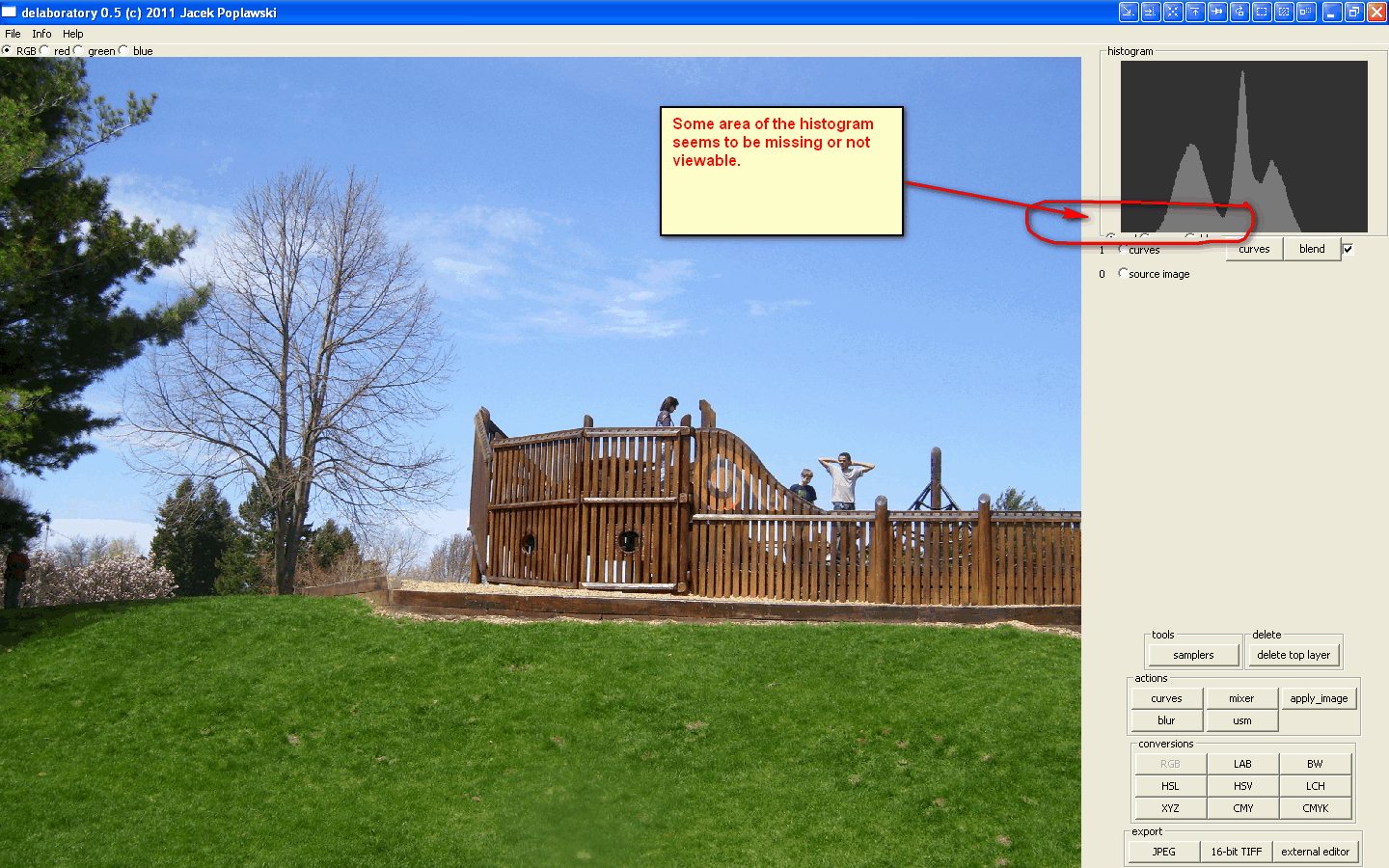
A issue with the histogram.
Also there is no edit>Undo?
Will an Help>About be added in the future?

Image

_________________
Image


Top
 Post subject: Re: Delaboratory
PostPosted: Sun Feb 05, 2012 12:04 am  (#16) 
Offline
GimpChat Member

Joined: Mar 14, 2011
Posts: 998
Rod wrote:
I installed the newest release of Delaboratory. :)
A issue with the histogram.
Also there is no edit>Undo?
Will an Help>About be added in the future?

Image

Hi Rod,

I see that you installed version 0.5. Can you install 0.5.9.3 beta and give us feedback on that? Some of your other questions are still work in progress with Jacek should be able to answer. I have already sent him an email.

Thanks,
Partha


Top
 Post subject: Re: Delaboratory
PostPosted: Sun Feb 05, 2012 3:40 am  (#17) 
Offline
Global Moderator
User avatar

Joined: May 16, 2010
Posts: 16023
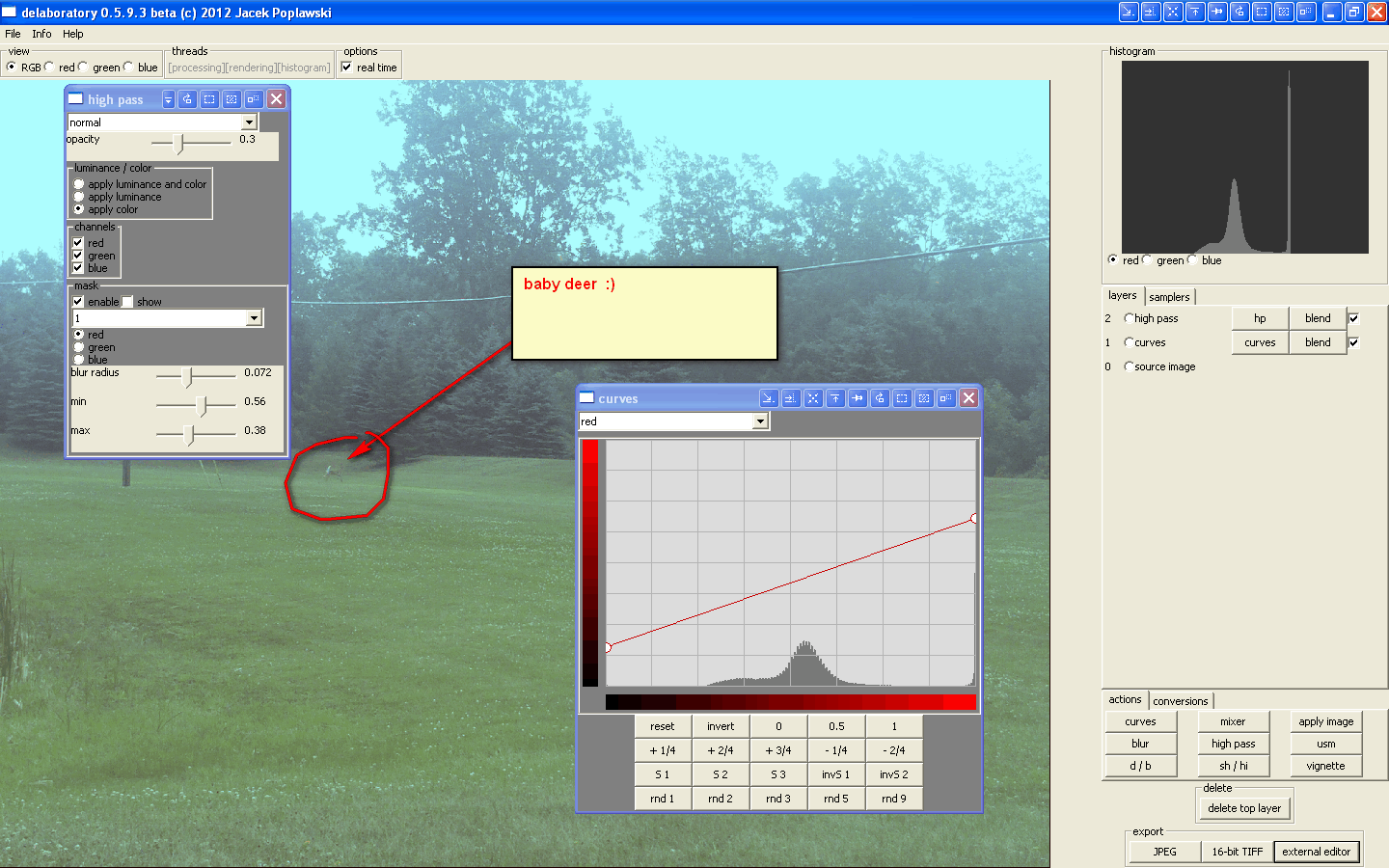
Yes this is much better.Nice results too. :)
I like the export to Gimp-2.7 option.
Here are my two examples.

Inside Delaboratory

Image

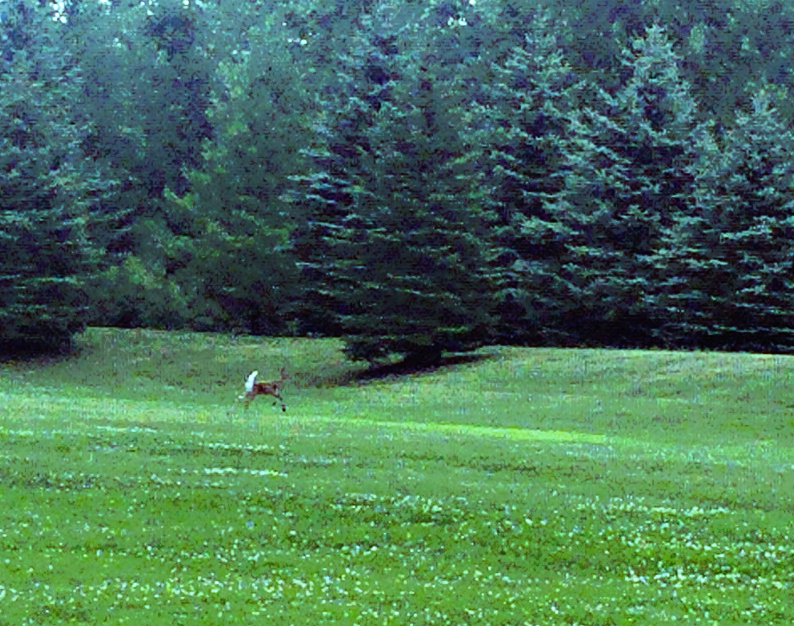
Result after Gimp-2.7 fixes

Image

I like it quite a bit.

_________________
Image


Top
 Post subject: Re: Delaboratory
PostPosted: Sun Feb 05, 2012 10:58 am  (#18) 
Offline
GimpChat Member

Joined: Jun 02, 2011
Posts: 58
hello again :)

there is no "Undo" because one need to design what should it do, each operation is an adjustement layer, let's say you change the curve, then you hit undo, what should be the result of undo? move back last point on curve you clicked? move curve the the previous stage (which one)? rewind layer stack to the point when curve was not there? that's a question to think about :)

about the deer - I tried to implement zoom and it was working, however, I failed with good design of UI for it, I put it under mouse wheel but then I needed to move the view after zoom in and I connected that to mouse move with button pressed down, then I realized there is a conflict between zoom, sampler and curve markers, so I decided the best solution is to remove zoom support for now, I will back to it later


Top
 Post subject: Re: Delaboratory
PostPosted: Sun Feb 05, 2012 5:28 pm  (#19) 
Offline
Global Moderator
User avatar

Joined: May 16, 2010
Posts: 16023
That is a good point. :)
Glad to hear zoom may be included also.Perhaps you could use the keyboard + for zoom in and - to zoom out?
Just a thought.

Thanks again for a great color adjustment program.I am looking forward to more upgrades.

_________________
Image


Top
 Post subject: Re: Delaboratory
PostPosted: Sun Feb 05, 2012 6:43 pm  (#20) 
Offline
GimpChat Member

Joined: Jun 02, 2011
Posts: 58
zoom in and zoom out is not a problem, it can be +/- and it can be mouse wheel
the problem is how to move image when it is zoomed in, if you use mouse for that, then mouse can't be used at the same time for samplers, because it's quite confusing
I must resolve that out until introducing zoom again


Top
 Post subject: Re: Delaboratory
PostPosted: Sun Feb 05, 2012 7:00 pm  (#21) 
Offline
Global Moderator
User avatar

Joined: May 16, 2010
Posts: 16023
Can you use the left, right, up and down arrow keys for movement while zoomed? :)

_________________
Image


Top
 Post subject: Re: Delaboratory
PostPosted: Mon Feb 06, 2012 10:42 am  (#22) 
Offline
GimpChat Member

Joined: Jul 11, 2010
Posts: 349
Why can't you use the same method that Gimp uses? Holding down the space bar, lets you move the picture. Releasing it goes back to the original tool.


Top
 Post subject: Re: Delaboratory
PostPosted: Tue Feb 07, 2012 11:03 am  (#23) 
Offline
GimpChat Member
User avatar

Joined: Jan 13, 2011
Posts: 2639
Location: Poland
A better solution for image transfer to Delaboratory is plugin (for Windows) RobA (XnView http://www.gimpchat.com/viewtopic.php?f=9&t=970&start=20#p10510 ) - that there is no problem spaces in the path name ("\"C:\\Program Files\\Delaboratory\\delaboratory.exe\" \"")

You need to replace:
pdb.file_png_save_defaults(tempimage, tempdrawable, tempfilename, tempfilename)

to the:
pdb.file_tiff_save2(tempimage, tempdrawable, tempfilename, tempfilename, 0, 1)

#!/usr/bin/env python
# -*- coding: utf-8 -*-

'''
Author:Rob Antonishen
XNViewShell.py (http://www.gimpchat.com/download/file.php?id=1098)
call XNView to allow processing using photoshop plugins.  Windows Only.
Version:0.3 Fixed to work with filters that change alpha.
this script is modelled after the mm extern LabCurves trace plugin
by Michael Munzert http://www.mm-log.com/lab-curves-gimp

Modified for Delaboratory MareroQ 07.02.2012

License:
This program is free software; you can redistribute it and/or modify
it under the terms of the GNU General Public License as published by
the Free Software Foundation; version 3 of the License.

This program is distributed in the hope that it will be useful,
but WITHOUT ANY WARRANTY; without even the implied warranty of
MERCHANTABILITY or FITNESS FOR A PARTICULAR PURPOSE.  See the
GNU General Public License for more details.

The GNU Public License is available at
http://www.gnu.org/copyleft/gpl.html

'''

from gimpfu import *
import shlex
import subprocess
import os, sys
import tempfile

def plugin_main(image, drawable, visible):
  pdb.gimp_image_undo_group_start(image)
 
  # Copy so the save operations doesn't affect the original
  if visible == 0:
    # Save in temporary.  Note: empty user entered file name
    temp = pdb.gimp_image_get_active_drawable(image)
  else:
    # Get the current visible
    temp = pdb.gimp_layer_new_from_visible(image, image, "Visible")
    image.add_layer(temp, 0)

  buffer = pdb.gimp_edit_named_copy(temp, "DelaboratoryShellTemp")

  #save selection if one exists
  hassel = pdb.gimp_selection_is_empty(image) == 0
  if hassel:
    savedsel = pdb.gimp_selection_save(image)
   
  tempimage = pdb.gimp_edit_named_paste_as_new(buffer)
  pdb.gimp_buffer_delete(buffer)
  if not tempimage:
    raise RuntimeError
  pdb.gimp_image_undo_disable(tempimage)

  tempdrawable = pdb.gimp_image_get_active_layer(tempimage)

  # Use temp file names from gimp, it reflects the user's choices in gimp.rc
  # change as indicated if you always want to use the same temp file name
  tempfilename = pdb.gimp_temp_name("tif")
  #tempfilename = os.path.join(tempfile.gettempdir(), "Delaboratorytempfile.tif")
 

  # !!! Note no run-mode first parameter, and user entered filename is empty string
  pdb.gimp_progress_set_text ("Saving a copy")
  pdb.file_tiff_save2(tempimage, tempdrawable, tempfilename, tempfilename, 0, 1)

  # Command line - Change to match where you installed Delaboratory
  command = "\"C:\\Program Files\\Delaboratory\\delaboratory.exe\" \"" + tempfilename + "\""
  args = shlex.split(command)

  # Invoke external command
  pdb.gimp_progress_set_text ("run Delaboratory...")
  pdb.gimp_progress_pulse()
  child = subprocess.Popen(args, shell=False)
  child.communicate()

  # put it as a new layer in the opened image
  try:
    newlayer2 = pdb.gimp_file_load_layer(tempimage, tempfilename)
  except:
    RuntimeError
  tempimage.add_layer(newlayer2,-1)
  buffer = pdb.gimp_edit_named_copy(newlayer2, "DelaboratoryShellTemp")

  if visible == 0:
    sel = pdb.gimp_edit_named_paste(drawable, buffer, 1)
  else:
    sel = pdb.gimp_edit_named_paste(temp, buffer, 1)
   
  pdb.gimp_buffer_delete(buffer)
  pdb.gimp_edit_clear(temp)   
  pdb.gimp_floating_sel_anchor(sel)

  #load up old selection
  if hassel:
    pdb.gimp_selection_load(savedsel)
    image.remove_channel(savedsel)
 
  # cleanup
  os.remove(tempfilename)  # delete the temporary file
  gimp.delete(tempimage)   # delete the temporary image

  # Note the new image is dirty in Gimp and the user will be asked to save before closing.
  pdb.gimp_image_undo_group_end(image)
  gimp.displays_flush()


register(
        "python_fu_Delaboratoryshell",
        "Pass the image to Delaboratory.",
        "Call Delaboratory",
        "Rob Antonishen",
        "Copyright 2011 Rob Antonishen",
        "2011",
        "<Image>/Filters/Extensions/Export to Delaboratory...",
        "RGB*, GRAY*",
        [ (PF_RADIO, "visible", "Layer:", 1, (("new from visible", 1),("current layer",0)))
        ],
        [],
        plugin_main,
        )

main()


Because Delabolatory does not support the file type *.png - You can not use Shellout (http://registry.gimp.org/node/24977 ) :
["Menu Label", "command", "ext"]
it change file extension - but not a real format.


Ps.
RobA solved the problem in 5 minutes
New Shellout is here - works great
http://www.gimpchat.com/viewtopic.php?f=9&t=970&start=170%20#%20p17957
  ["Delaboratory", "\"c:\\Program Files\\Delaboratory\\delaboratory.exe\"", "tiff"],

_________________
Image


Top
 Post subject: Re: Delaboratory
PostPosted: Thu Feb 09, 2012 11:57 am  (#24) 
Offline
GimpChat Member

Joined: Jun 02, 2011
Posts: 58
bilbo9955 it may be good idea, but I will come back to zoom interface after 0.6 release


Top
 Post subject: Re: Delaboratory
PostPosted: Fri Feb 10, 2012 5:50 am  (#25) 
Offline
GimpChat Member

Joined: Mar 14, 2011
Posts: 998
Please download the latest beta and let us know if you have any issues with installation and with running the app.

Thanks,
Partha


Top
 Post subject: Re: Delaboratory
PostPosted: Thu Feb 23, 2012 4:26 pm  (#26) 
Offline
New Member

Joined: Feb 23, 2012
Posts: 1
Can't be moving pictures implemented with just Ctrl/Shift+Mouse or sth similar? It's really big inconvenience when working on images with small patterns, especially on small screen. Every time I have to cut part of image in gimp, get the settings right, save layer stack, open original image, restore layer stack :(
I miss deleting points on curves - like in gimp, or with additional key (don't know if is possible now at all).


Top
 Post subject: Re: Delaboratory
PostPosted: Mon Feb 27, 2012 6:06 am  (#27) 
Offline
GimpChat Member

Joined: Jun 02, 2011
Posts: 58
To delete point on curve you have two options:
- grab it with mouse and move away from panel
- select point and press "x"


Top
 Post subject: Re: Delaboratory
PostPosted: Mon Feb 27, 2012 8:37 am  (#28) 
Offline
GimpChat Member

Joined: Apr 12, 2010
Posts: 5870
a gmic plugin for delaboratory is still in your wish list ?
i would love it, and i well i would like to know if are progress

_________________
My 3D Gallery on Deviantart http://photocomix2.deviantart.com/
Main gallery http://www.flickriver.com/photos/photocomix-mandala/
Mandala and simmetry http://www.flickriver.com/photos/photocomix_mandala/

Image

Mrs Wilbress


Top
 Post subject: Re: Delaboratory
PostPosted: Mon Feb 27, 2012 6:28 pm  (#29) 
Offline
GimpChat Member

Joined: Mar 14, 2011
Posts: 998
PhotoComix wrote:
a gmic plugin for delaboratory is still in your wish list ?
i would love it, and i well i would like to know if are progress

Not on the list yet. :)

Stay tuned.


Top
 Post subject: Re: Delaboratory
PostPosted: Tue Feb 28, 2012 6:50 am  (#30) 
Offline
GimpChat Member

Joined: Jun 02, 2011
Posts: 58
RAW support and Zoom support are already on SVN.
Expect new stable version in weeks.

gmic support is very important but not so easy, so not on this release yet


Top
Post new topic Reply to topic  [ 128 posts ]  Go to page 1, 2, 3, 4, 5 ... 7  Next

All times are UTC - 5 hours [ DST ]


* Login  


Powered by phpBB3 © phpBB Group