It is currently Wed Nov 25, 2026 11:42 am


All times are UTC - 5 hours [ DST ]


Post new topic Reply to topic  [ 42 posts ]  Go to page 1, 2, 3  Next
Author Message
 Post subject: Re: Gimp 2.8
PostPosted: Wed Feb 01, 2012 4:28 pm  (#11) 
Offline
GimpChat Member

Joined: Apr 12, 2010
Posts: 5870
Not for most plugins, they may give harmless warning but will work (and the warning may be silently redirected on the error console where will not disturb )

I believe one of the thing still missed for 2.8 is a sort of layer to assure backward-compatibilty with previous script and plugin and eliminate the useless warnings

_________________
My 3D Gallery on Deviantart http://photocomix2.deviantart.com/
Main gallery http://www.flickriver.com/photos/photocomix-mandala/
Mandala and simmetry http://www.flickriver.com/photos/photocomix_mandala/

Image

Mrs Wilbress


Top
 Post subject: Re: Gimp 2.8
PostPosted: Thu Feb 02, 2012 4:10 am  (#12) 
Offline
Script Coder
User avatar

Joined: Jun 22, 2010
Posts: 1171
Location: Here and there
gerard82 wrote:
I visit this site daily.
http://git.gnome.org/browse/gimp/
They are still finding and repairing bugs.
Then there's a lot of translation updates in many languages.
Gerard.


Looks like things are taking a turn sideways: anyone for 2.6.12 ?


Top
 Post subject: Re: Gimp 2.8
PostPosted: Thu Feb 02, 2012 9:03 am  (#13) 
Offline
GimpChat Member
User avatar

Joined: Oct 29, 2010
Posts: 711
Location: Netherlands
Or 2.6.13?
Gerard.

_________________
Gentoo Linux always up-to-date.
Kernel-3.17.4 Python-2.7.8/3.3.5
Gimp-2.8.14

I use Linux only.
And Virtualbox with Win 7


Top
 Post subject: Re: Gimp 2.8
PostPosted: Fri Feb 03, 2012 4:14 pm  (#14) 
Offline
Script Coder
User avatar

Joined: Jun 22, 2010
Posts: 1171
Location: Here and there
gerard82 wrote:
Or 2.6.13?
Gerard.


No, 2.6.12 is it for the 2.6.x series: http://www.gimp.org/


Top
 Post subject: Re: Gimp 2.8
PostPosted: Fri Feb 03, 2012 4:16 pm  (#15) 
Offline
GimpChat Member
User avatar

Joined: Sep 24, 2010
Posts: 12870
Had no idea they released 2.6.12. Going to check it out now paynekj. :)

edit: no Windows compile yet. Not really necessary unless it improves on the stability issues, but they've been there for quite a while now so doubt it. :)

_________________
Lyle

Psalm 109:8

Image


Top
 Post subject: Re: Gimp 2.8
PostPosted: Fri Feb 03, 2012 7:11 pm  (#16) 
Offline
GimpChat Member
User avatar

Joined: Jan 06, 2011
Posts: 26
found these comments on the Gimp Google+ page:

GIMP - We kinda mention all the time that v2.8 will be out when the rest of the bugs have been fixed. There are some 20 or so of them left. We fixed a bad docking dialogs regression just yesterday, wouldn't dream of releasing 2.8 without it.
Feb 1, 2012


GIMP - Currently there are smth like 20 bugs left to fix. Plus splash screen is missing and the release notes have to be finished. It might take a while.
Jan 23, 2012


Seems like they're updating the page pretty frequently with what's going on


Top
 Post subject: Re: Gimp 2.8
PostPosted: Sat May 12, 2012 11:20 am  (#17) 
Offline
GimpChat Member
User avatar

Joined: Jul 04, 2011
Posts: 395
Location: Indianapolis, IN
Anybody know if python is included with Gimp2.8 or if not what I'll have to do in order to have those plugins still be workable?

I've been waiting but .. this is the last question. I asked a fellow Gimp'r but that person doesn't use plug-ins.

I'll be waiting to hear!

Thx so much!

_________________
"That which does not kill us makes us stronger." ~ Friedrich Nietzsche


Top
 Post subject: Re: Gimp 2.8
PostPosted: Sat May 12, 2012 11:33 am  (#18) 
Offline
GimpChat Member

Joined: Mar 14, 2011
Posts: 998
MrBiggz wrote:
Anybody know if python is included with Gimp2.8 or if not what I'll have to do in order to have those plugins still be workable?

I've been waiting but .. this is the last question. I asked a fellow Gimp'r but that person doesn't use plug-ins.

I'll be waiting to hear!

Thx so much!

No, Python is not part of Gimp 2.8. It's a separate application. My particular build includes Python.


Top
 Post subject: Re: Gimp 2.8
PostPosted: Sat May 12, 2012 4:25 pm  (#19) 
Offline
GimpChat Member
User avatar

Joined: Sep 29, 2011
Posts: 120
Location: Texas
Partha, I am posting this here as you mention python being in your build. I am trying to get Gurm to work which is a python application I believe. I have .py and .ini in C:\Users\jorden\.gimp-2.8\plug-ins....changed the .py to show the ini in the correct folder......but it shows not under Filters.
And actually, down at the bottom of the filters menu where Script-Fu > shows...i used to have a python > console as well, and this is no longer there. Is there something I need to do to get the python part active.... ? I see no reference to python anywhere under any menu nor can I get Gurm to work. (I haven't yet gotten to any other .py scripts, going to check now)

Edit: I don't see any of my .py plug-ins showing up in Gimp anymore. The only one I'll really miss is GURM, as I have soooooooo many brushes it was nice to not have GIMP always load them all all the time, and to be able to go in and choose the one's I needed.

Edit Edit: Ohhhh :( but it does include the callout .py I used to get a section of an image into paint.net to use the liquify tool on.....that is sad...I hope the issue is something silly on my part I forgot to do.

Edit Edit Edit: I have python 3.2 on my system.

_________________
“There´s tools and colours for all of us,
to lend from nature to make the world
more understandable and beautiful”.

Image


Top
 Post subject: Re: Gimp 2.8
PostPosted: Sat May 12, 2012 6:17 pm  (#20) 
Offline
GimpChat Member

Joined: Mar 14, 2011
Posts: 998
Jorden wrote:
Partha, I am posting this here as you mention python being in your build. I am trying to get Gurm to work which is a python application I believe. I have .py and .ini in C:\Users\jorden\.gimp-2.8\plug-ins....changed the .py to show the ini in the correct folder......but it shows not under Filters.
And actually, down at the bottom of the filters menu where Script-Fu > shows...i used to have a python > console as well, and this is no longer there. Is there something I need to do to get the python part active.... ? I see no reference to python anywhere under any menu nor can I get Gurm to work. (I haven't yet gotten to any other .py scripts, going to check now)

Edit: I don't see any of my .py plug-ins showing up in Gimp anymore. The only one I'll really miss is GURM, as I have soooooooo many brushes it was nice to not have GIMP always load them all all the time, and to be able to go in and choose the one's I needed.

Edit Edit: Ohhhh :( but it does include the callout .py I used to get a section of an image into paint.net to use the liquify tool on.....that is sad...I hope the issue is something silly on my part I forgot to do.

Edit Edit Edit: I have python 3.2 on my system.

Jorden,

I think you are not using my build which includes Python 2.7.3. My guess is that your python scripts have to be updated for Python 3.x which is a major change and not backward compatible.


Top
 Post subject: Re: Gimp 2.8
PostPosted: Sat May 12, 2012 7:38 pm  (#21) 
Offline
GimpChat Member
User avatar

Joined: Sep 29, 2011
Posts: 120
Location: Texas
I installed the 64-bit gimp I d'loaded off Your website...I see the python folder in the gimp folders....I have python 3.2 on my machine...I'm a bit confused now.

Here is where I posted screenshots.... on the other thread of yours.. viewtopic.php?f=7&t=4254&start=10#p52571

I downloaded it from here http://www.partha.com/

and did a clean install....only installed gimp for windows 64, the new useful plugins...and that's it....all is working great except the phython issue, which i see the python folders in the gimp folder....I have 3.2..it worked in your build 2.76 (I only use your builds and always do a clean install.....so what should I do to fix? I'm confused.

_________________
“There´s tools and colours for all of us,
to lend from nature to make the world
more understandable and beautiful”.

Image


Top
 Post subject: Re: Gimp 2.8
PostPosted: Sat May 12, 2012 8:29 pm  (#22) 
Offline
Global Moderator
User avatar

Joined: May 16, 2010
Posts: 16309
Jorden could you open the \lib\gimp\2.0\interpreters\pygimp.interp file and paste the contents here nested within code tags?
I am pretty sure Parthas versions all have python27 working out of the program directory itself.So there shouldn't be any need for a C:\Python32 install for them to work.
I am just curious as to what path is in that file.

_________________
Image


Top
 Post subject: Re: Gimp 2.8
PostPosted: Sat May 12, 2012 8:58 pm  (#23) 
Offline
Global Moderator
User avatar

Joined: May 16, 2010
Posts: 16309
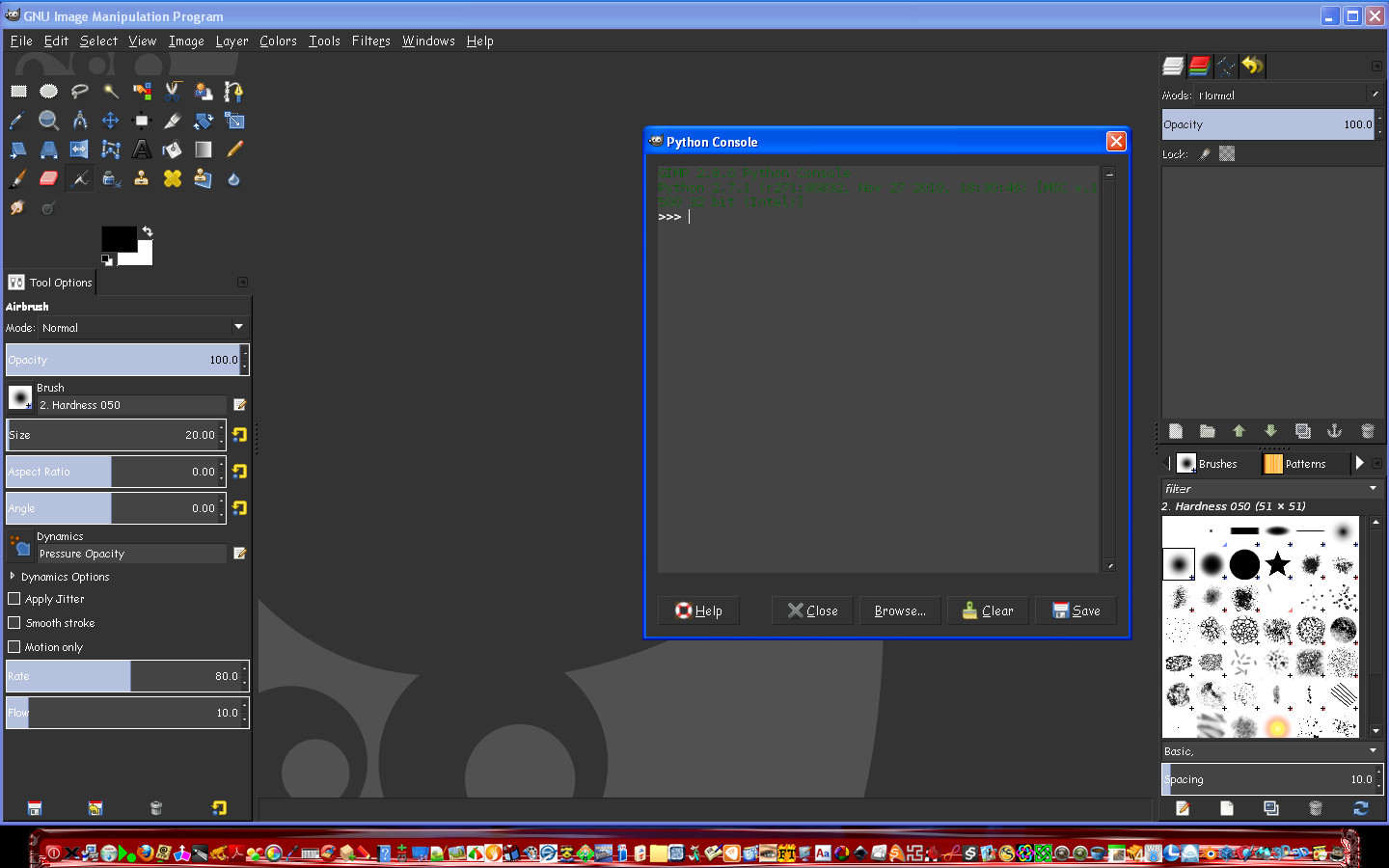
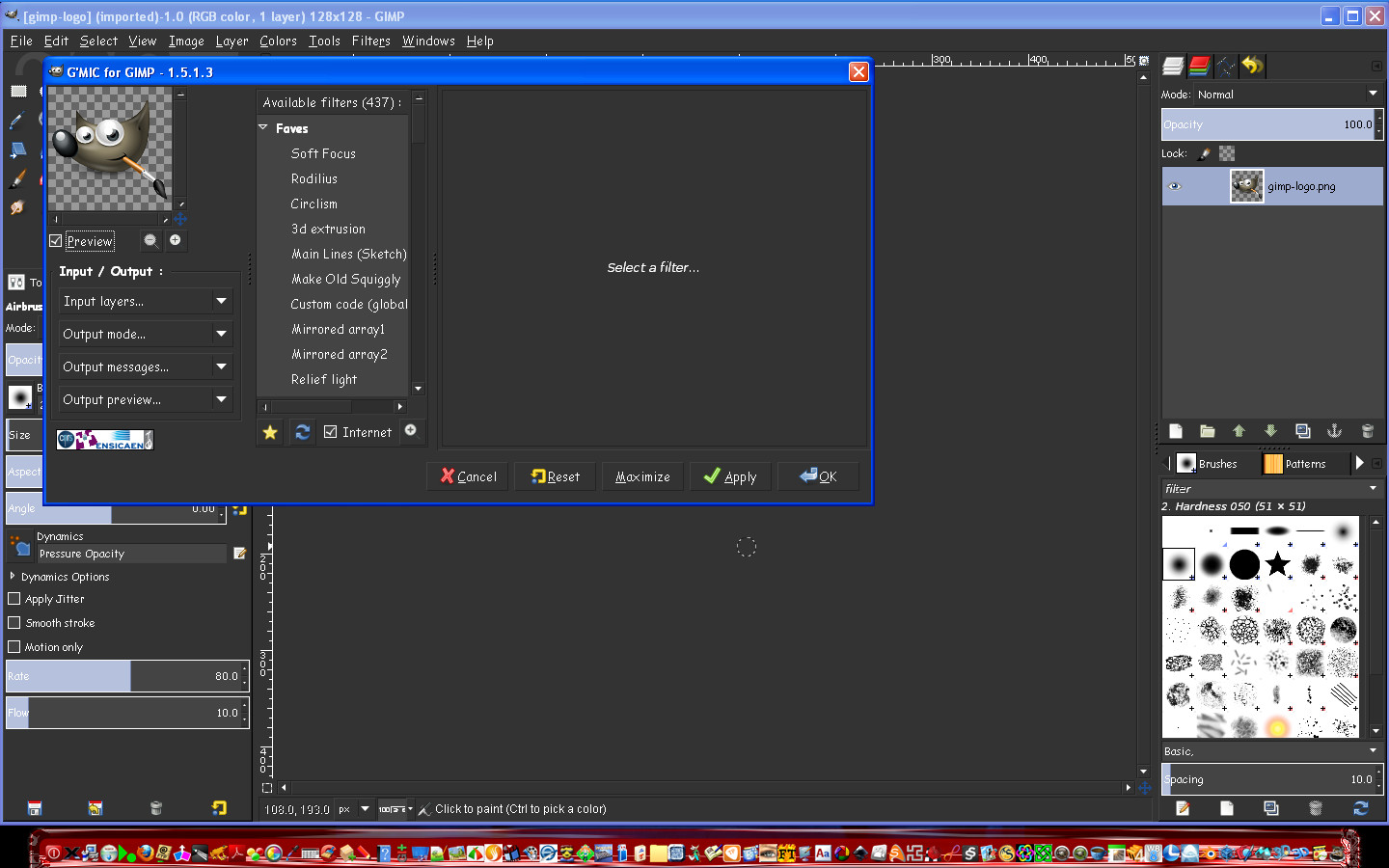
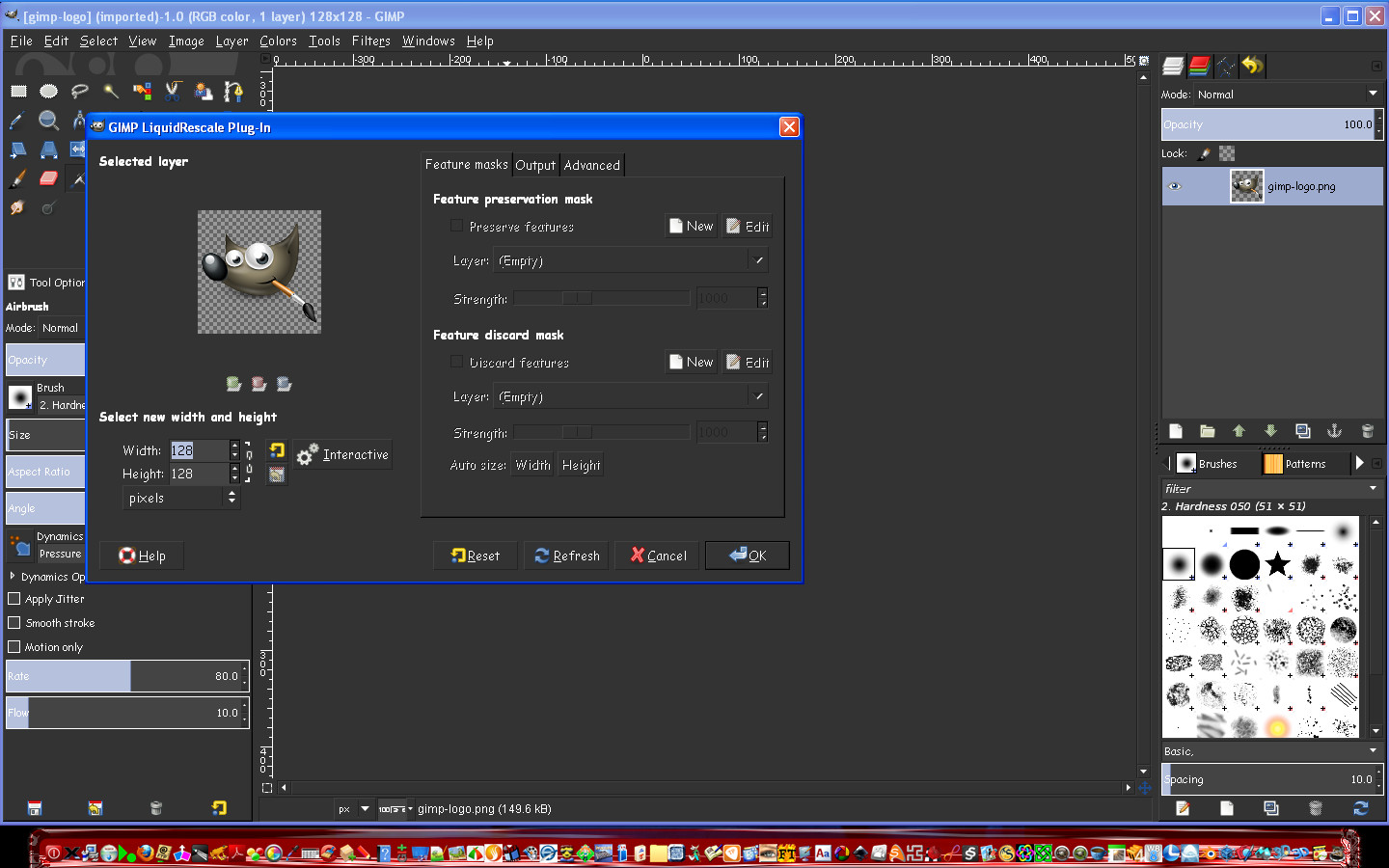
Partha this build for windows 32 is perfect. All plugins work for me as well as python. :)
Nicely done! :hi5
Here are some screenshots.

Image
Image
Image
Image
Image

And my final setup. :)
Image

I have one request however.
The default theme allows a nice theme (i love the colors)
BUT it will not allow me to use small icons without switching back to the blah theme for Gimp.
Can you include a way to enable small icons with the dark theme?
I know how to fix this myself but others may not want to go that route.

Thanks and you have another perfect build here. :bigthup

_________________
Image


Top
 Post subject: Re: Gimp 2.8
PostPosted: Sat May 12, 2012 9:04 pm  (#24) 
Offline
Global Moderator
User avatar

Joined: May 16, 2010
Posts: 16309
Image with the gtkrc file fix. (small icons)

Image

_________________
Image


Top
 Post subject: Re: Gimp 2.8
PostPosted: Sat May 12, 2012 9:10 pm  (#25) 
Offline
GimpChat Member

Joined: Mar 14, 2011
Posts: 998
Jorden wrote:
I installed the 64-bit gimp I d'loaded off Your website...I see the python folder in the gimp folders....I have python 3.2 on my machine...I'm a bit confused now.

Here is where I posted screenshots.... on the other thread of yours.. viewtopic.php?f=7&t=4254&start=10#p52571

I downloaded it from here http://www.partha.com/

and did a clean install....only installed gimp for windows 64, the new useful plugins...and that's it....all is working great except the phython issue, which i see the python folders in the gimp folder....I have 3.2..it worked in your build 2.76 (I only use your builds and always do a clean install.....so what should I do to fix? I'm confused.

Jorden,

You don't need to install python. My build has python included and during installation, I set the path in the file that Rod was talking about. So, no need for you to install python. If it was working for 2.7.6, it will work for 2.8.

If you have issues, just PM me or leave me a message on my website. We can straighten this out. :)

Thanks,
Partha


Top
 Post subject: Re: Gimp 2.8
PostPosted: Sat May 12, 2012 9:14 pm  (#26) 
Offline
GimpChat Member

Joined: Mar 14, 2011
Posts: 998
Rod wrote:
Partha this build for windows 32 is perfect. All plugins work for me as well as python. :)
Nicely done! :hi5
Here are some screenshots.

...
And my final setup. :)
Image

I have one request however.
The default theme allows a nice theme (i love the colors)
BUT it will not allow me to use small icons without switching back to the blah theme for Gimp.
Can you include a way to enable small icons with the dark theme?
I know how to fix this myself but others may not want to go that route.

Thanks and you have another perfect build here. :bigthup

Thanks Rod. :)

I see you fixed it yourself. :)


Top
 Post subject: Re: Gimp 2.8
PostPosted: Sat May 12, 2012 9:17 pm  (#27) 
Offline
GimpChat Member
User avatar

Joined: Sep 29, 2011
Posts: 120
Location: Texas
I sent a PM it's just so wierd.... everything is perfect..cept for this..and I installed it as normal....thanks so much partha!!!!!!!!

_________________
“There´s tools and colours for all of us,
to lend from nature to make the world
more understandable and beautiful”.

Image


Top
 Post subject: Re: Gimp 2.8
PostPosted: Sat May 12, 2012 9:28 pm  (#28) 
Offline
GimpChat Member
User avatar

Joined: Sep 29, 2011
Posts: 120
Location: Texas
Rod wrote:
Jorden could you open the \lib\gimp\2.0\interpreters\pygimp.interp file and paste the contents here nested within code tags?
I am pretty sure Parthas versions all have python27 working out of the program directory itself.So there shouldn't be any need for a C:\Python32 install for them to work.
I am just curious as to what path is in that file.


python=c:\Win64\Python27\pythonw.exe
/usr/bin/python=c:\Win64\Python27\pythonw.exe
:Python:E::py::python:

_________________
“There´s tools and colours for all of us,
to lend from nature to make the world
more understandable and beautiful”.

Image


Top
 Post subject: Re: Gimp 2.8
PostPosted: Sat May 12, 2012 9:47 pm  (#29) 
Offline
GimpChat Member

Joined: Mar 14, 2011
Posts: 998
Jorden wrote:
Rod wrote:
Jorden could you open the \lib\gimp\2.0\interpreters\pygimp.interp file and paste the contents here nested within code tags?
I am pretty sure Parthas versions all have python27 working out of the program directory itself.So there shouldn't be any need for a C:\Python32 install for them to work.
I am just curious as to what path is in that file.


python=c:\Win64\Python27\pythonw.exe
/usr/bin/python=c:\Win64\Python27\pythonw.exe
:Python:E::py::python:

That's not right. You found a bug. I sent you a PM.


Top
 Post subject: Re: Gimp 2.8
PostPosted: Sat May 12, 2012 9:48 pm  (#30) 
Offline
Global Moderator
User avatar

Joined: May 16, 2010
Posts: 16309
Jorden wrote:
Rod wrote:
Jorden could you open the \lib\gimp\2.0\interpreters\pygimp.interp file and paste the contents here nested within code tags?
I am pretty sure Parthas versions all have python27 working out of the program directory itself.So there shouldn't be any need for a C:\Python32 install for them to work.
I am just curious as to what path is in that file.


python=c:\Win64\Python27\pythonw.exe
/usr/bin/python=c:\Win64\Python27\pythonw.exe
:Python:E::py::python:


As i thought.
Change it to this Jorden. :) Or to where ever you installed Gimp-2.8.

python=C:\Program Files\Gimp-2.8\python\pythonw.exe
/usr/bin/python=C:\Program Files\Gimp-2.8\python\pythonw.exe
:Python:E::py::python:

_________________
Image


Top
Post new topic Reply to topic  [ 42 posts ]  Go to page 1, 2, 3  Next

All times are UTC - 5 hours [ DST ]


* Login  


Powered by phpBB3 © phpBB Group