It is currently Wed Nov 25, 2026 11:45 am


All times are UTC - 5 hours [ DST ]


Post new topic Reply to topic  [ 31 posts ]  Go to page 1, 2  Next
Author Message
 Post subject: Re: Some more op-art
PostPosted: Mon Dec 16, 2013 8:49 am  (#11) 
Offline
Script Coder
User avatar

Joined: Oct 25, 2010
Posts: 4812
Same with tiny circles:

Attachment:
HorseHead-Circles.png
HorseHead-Circles.png [ 42.88 KiB | Viewed 2293 times ]

_________________
Image


Top
 Post subject: Re: Some more op-art
PostPosted: Mon Dec 16, 2013 10:04 am  (#12) 
Offline
GimpChat Member

Joined: Apr 12, 2010
Posts: 5870
:clap :clap :clap cool looking forward for the script :jumpclap

_________________
My 3D Gallery on Deviantart http://photocomix2.deviantart.com/
Main gallery http://www.flickriver.com/photos/photocomix-mandala/
Mandala and simmetry http://www.flickriver.com/photos/photocomix_mandala/

Image

Mrs Wilbress


Top
 Post subject: Re: Some more op-art
PostPosted: Mon Dec 16, 2013 10:19 am  (#13) 
Offline
GimpChat Member
User avatar

Joined: Jan 03, 2011
Posts: 1656
ofnuts, really cool idea. Two years ago, I've added a 'Dots' filter in G'MIC, that is able to create things like your very first example. But today, you have made me realized that my filter was old and need some update. So here it is.

I've added a new filter Patterns / Shapes in the G'MIC plug-in for GIMP, that is strongly inspired by what ofnuts proposed in this thread. It looks like this :

Attachment:
gmic_shapes_all.jpg
gmic_shapes_all.jpg [ 314.16 KiB | Viewed 2282 times ]


And a zoom on the preview images :

Attachment:
gmic_shapes_all2.jpg
gmic_shapes_all2.jpg [ 336.27 KiB | Viewed 2282 times ]


You can select the shapes type (circles, squares, diamonds, horizontal or vertical stripes), and various parameters for the type of rendering. At the end, this is a quite versatile filter that can create lot of different effects.
Hope you'll enjoy it, and thanks again ofnuts for the great idea !


Top
 Post subject: Re: Some more op-art
PostPosted: Mon Dec 16, 2013 11:30 am  (#14) 
Offline
GimpChat Member
User avatar

Joined: Jul 17, 2012
Posts: 2769
Ronounours wrote:
I've added a new filter Patterns / Shapes in the G'MIC plug-in for GIMP, that is strongly inspired by what ofnuts proposed in this thread.

thanks for another great filter, Ronounours !!!!

wouldnt it be nicer if it was called Op-Art instead ?

thats a bit more intuitive than Shapes

just a suggestion


Top
 Post subject: Re: Some more op-art
PostPosted: Mon Dec 16, 2013 11:34 am  (#15) 
Offline
GimpChat Member
User avatar

Joined: Jan 03, 2011
Posts: 1656
No problem, let call it 'Op art' if you want :)
I was not very happy with the filter name.


Top
 Post subject: Re: Some more op-art
PostPosted: Mon Dec 16, 2013 11:58 am  (#16) 
Offline
Script Coder
User avatar

Joined: Oct 25, 2010
Posts: 4812
Ronounours wrote:
ofnuts, really cool idea. Two years ago, I've added a 'Dots' filter in G'MIC, that is able to create things like your very first example. But today, you have made me realized that my filter was old and need some update. So here it is.

I've added a new filter Patterns / Shapes in the G'MIC plug-in for GIMP, that is strongly inspired by what ofnuts proposed in this thread. It looks like this :


And a zoom on the preview images :

You can select the shapes type (circles, squares, diamonds, horizontal or vertical stripes), and various parameters for the type of rendering. At the end, this is a quite versatile filter that can create lot of different effects.
Hope you'll enjoy it, and thanks again ofnuts for the great idea !


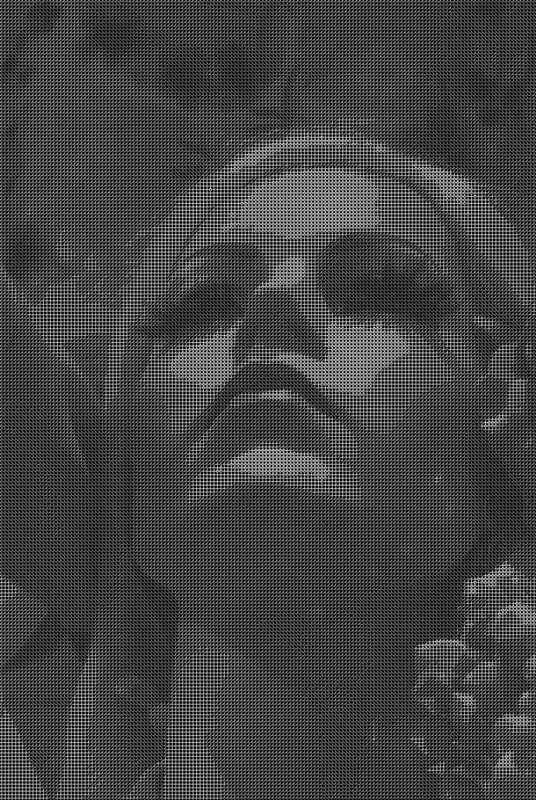
With my low-tech script you can use anything for the shapes:

Attachment:
Portman-Ascii-GMIC.png
Portman-Ascii-GMIC.png [ 54.45 KiB | Viewed 2271 times ]

_________________
Image


Top
 Post subject: Re: Some more op-art
PostPosted: Mon Dec 16, 2013 12:59 pm  (#17) 
Offline
GimpChat Member
User avatar

Joined: Jul 21, 2012
Posts: 103
:coolthup

_________________
Image


Top
 Post subject: Re: Some more op-art
PostPosted: Wed Dec 18, 2013 10:49 pm  (#18) 
Offline
GimpChat Member
User avatar

Joined: Oct 06, 2010
Posts: 4050
Very very interesting, Ofnuts!

David, impressive at how quick you turn things around in GMIC - scripts to working GMIC functions.

_________________
"In order to attain the impossible, one must attempt the absurd."
~ Miguel de Cervantes


Top
 Post subject: Re: Some more op-art
PostPosted: Thu Dec 19, 2013 2:42 am  (#19) 
Offline
GimpChat Member
User avatar

Joined: Sep 24, 2010
Posts: 12870
Extremely cool Offnuts. Including my pattern set (just scaled it down to 10x10 for this render). Hope others will share their patterns too. :)


Attachments:
Untitled.png
Untitled.png [ 515.62 KiB | Viewed 2220 times ]
dot_pat.xcf [31.37 KiB]
Downloaded 100 times

_________________
Lyle

Psalm 109:8

Image
Top
 Post subject: Re: Some more op-art
PostPosted: Thu Dec 19, 2013 2:58 am  (#20) 
Offline
GimpChat Member
User avatar

Joined: Sep 24, 2010
Posts: 12870
Why not a truchet blend too (originally had to do this the hard way and too lazy to find the tut). Would be cool to try Wallace's pipes too but way too lazy to do so myself. Again, I scalled the pattern before applying it. :)


Attachments:
truchet_AU.png
truchet_AU.png [ 138.66 KiB | Viewed 2215 times ]
truchet.xcf [32.91 KiB]
Downloaded 94 times

_________________
Lyle

Psalm 109:8

Image
Top
 Post subject: Re: Some more op-art
PostPosted: Thu Dec 19, 2013 12:42 pm  (#21) 
Offline
GimpChat Member
User avatar

Joined: Jan 03, 2011
Posts: 1656
I've also added an option in the G'MIC Patterns/Op art filter to allow an user to add its own custom shapes defined in top layers over the image. The entry 'Custom shapes' must be selected for the parameter 'Shape', like I did in the screenshot below :

Attachment:
gmic_opart.png
gmic_opart.png [ 127.81 KiB | Viewed 1665 times ]


It's a bit similar to the way the Pack sprites works.
You can still have a control on the minimal and maximal size of your shapes with the sliders.
Finally, you get something like this (added a black background to get rid of the transparency) :

Attachment:
gmic_custom_opart.jpg
gmic_custom_opart.jpg [ 563.85 KiB | Viewed 1665 times ]


There are still some minor problems with the preview, but I hope I can fix them soon.
Hope you will enjoy it.


Top
 Post subject: Re: Some more op-art
PostPosted: Thu Dec 19, 2013 1:04 pm  (#22) 
Offline
GimpChat Member
User avatar

Joined: Jan 03, 2011
Posts: 1656
Another example, with sprites I took from the Gauntlet arcade game.

Attachment:
gmic_gauntlet.jpg
gmic_gauntlet.jpg [ 2.71 MiB | Viewed 1660 times ]


And with another image :

Attachment:
gmic_gauntlet2.jpg
gmic_gauntlet2.jpg [ 1.76 MiB | Viewed 1660 times ]


Top
 Post subject: Re: Some more op-art
PostPosted: Thu Dec 19, 2013 3:29 pm  (#23) 
Offline
GimpChat Member
User avatar

Joined: Sep 24, 2010
Posts: 12870
Ronounours wrote:
I've also added an option in the G'MIC Patterns/Op art filter to allow an user to add its own custom shapes defined in top layers over the image. The entry 'Custom shapes' must be selected for the parameter 'Shape', like I did in the screenshot below :

Attachment:
gmic_opart.png


It's a bit similar to the way the Pack sprites works.
You can still have a control on the minimal and maximal size of your shapes with the sliders.
Finally, you get something like this (added a black background to get rid of the transparency) :

Attachment:
gmic_custom_opart.jpg


Awesome David; was waiting for the G'MIC equivalent. Would be close to packed sprites except that you don't pack them; just align them. lol

:)

There are still some minor problems with the preview, but I hope I can fix them soon.
Hope you will enjoy it.

_________________
Lyle

Psalm 109:8

Image


Top
 Post subject: Re: Some more op-art
PostPosted: Thu Dec 19, 2013 5:47 pm  (#24) 
Offline
GimpChat Member
User avatar

Joined: Jul 17, 2012
Posts: 2769
good stuff :bigthup


Top
 Post subject: Re: Some more op-art
PostPosted: Thu Dec 19, 2013 6:40 pm  (#25) 
Offline
GimpChat Member
User avatar

Joined: Sep 24, 2010
Posts: 12870
G'MIC appears to give you a better dynamic w.r.t. the truchet set anyway. Again, thanks a heap David. I would post this at Flickr, but, Flickr's down for the count right now. :)


Attachments:
caricature.png
caricature.png [ 91.35 KiB | Viewed 1637 times ]

_________________
Lyle

Psalm 109:8

Image
Top
 Post subject: Re: Some more op-art
PostPosted: Thu Dec 19, 2013 6:54 pm  (#26) 
Offline
GimpChat Member
User avatar

Joined: Oct 06, 2010
Posts: 4050
I will probably add the bottlecap library and a new shades of coffee cups to this and see what it does.

_________________
"In order to attain the impossible, one must attempt the absurd."
~ Miguel de Cervantes


Top
 Post subject: Re: Some more op-art
PostPosted: Thu Dec 19, 2013 7:21 pm  (#27) 
Offline
GimpChat Member
User avatar

Joined: Sep 24, 2010
Posts: 12870
Cool to see that you are able to post some mahvin; where's your avatar? Look forward to seeing your result with the coffee cups. lol

:)

_________________
Lyle

Psalm 109:8

Image


Top
 Post subject: Re: Some more op-art
PostPosted: Thu Dec 19, 2013 7:45 pm  (#28) 
Offline
GimpChat Member
User avatar

Joined: Sep 24, 2010
Posts: 12870
Why not another one. The trick is to bend the result frame strategically to add dimension. lolol

Added Fencepost Chrome to the mix by the way. :)

ref: http://www.fontplay.com/freephotos/sixt ... 06-016.jpg

http://www.flickr.com/photos/34520999@N ... otostream/

Image

_________________
Lyle

Psalm 109:8

Image


Top
 Post subject: Re: Some more op-art
PostPosted: Sat Dec 21, 2013 2:02 pm  (#29) 
Offline
GimpChat Member

Joined: Apr 12, 2010
Posts: 5870
@ L
what the secret of your self portrait , how you modify the pattern along the edges intersecting that sort of Trochet ?

really nice effect , i like the last also the last less surprising but neat .

I will remove the most bright light spot on the right cheek , i mean the little spot in a dark area , i found it distracting .

Cool images anyway and cool filters

_________________
My 3D Gallery on Deviantart http://photocomix2.deviantart.com/
Main gallery http://www.flickriver.com/photos/photocomix-mandala/
Mandala and simmetry http://www.flickriver.com/photos/photocomix_mandala/

Image

Mrs Wilbress


Top
 Post subject: Re: Some more op-art
PostPosted: Sat Dec 21, 2013 5:09 pm  (#30) 
Offline
GimpChat Member
User avatar

Joined: Sep 24, 2010
Posts: 12870
Used my standard dup wavelet denoise (1000,80) set to Grain Extract and merged down, then ran G'MIC's Anisotrophic filter on that result before setting it to Grain Merge (only applied to the Trucet render; click here for details which includes the target pattern as an xcf). :)

_________________
Lyle

Psalm 109:8

Image


Top
Post new topic Reply to topic  [ 31 posts ]  Go to page 1, 2  Next

All times are UTC - 5 hours [ DST ]


* Login  


Powered by phpBB3 © phpBB Group